1. 概述
在本文中,我們將探討 Spring Security 框架中用於安全響應式應用程序的新功能。 此版本與 Spring 6 和 Spring Boot 3 保持一致。
在本文中,我們將不深入探討響應式應用程序本身,因為響應式應用程序是 Spring 5 框架中的一項新功能。 請務必查看“Reactor 核心介紹”文章以獲取更多詳細信息。
2. Maven 設置
我們將使用 Spring Boot Starter 引導我們的項目,幷包含所有必需的依賴項。
基本設置需要聲明父級、Web Starter 和 Security Starter 依賴項。 我們還需要 Spring Security 測試框架:
        org.springframework.boot
        spring-boot-starter-parent
        3.3.2


            org.springframework.boot
            spring-boot-starter-webflux


            org.springframework.boot
            spring-boot-starter-security


            org.springframework.security
            spring-security-test
            test
我們可以查看當前版本的 Spring Boot Security Starter 在 Maven Central 上獲取。
3. 項目設置
讓我們看看如何設置我們的項目。
3.1. 啓動反應式應用程序
我們不會使用標準的
註解
@ComponentScan(basePackages = {"com.baeldung.security"})
@EnableWebFlux
public class SpringSecurity6Application {

    public static void main(String[] args) {
        try (AnnotationConfigApplicationContext context
          = new AnnotationConfigApplicationContext(SpringSecurity6Application.class)) {
            context.getBean(NettyContext.class).onClose().block();
        }
    }
}
在這裏,我們創建一個新的應用程序上下文,並等待 Netty 通過調用 Netty 上下文上的
Netty 關閉後,上下文將使用
我們需要創建一個基於 Netty 的 HTTP 服務器、HTTP 請求的處理程序以及服務器和處理程序之間的適配器:
@Bean
public NettyContext nettyContext(ApplicationContext context) {
    HttpHandler handler = WebHttpHandlerBuilder
      .applicationContext(context).build();
    ReactorHttpHandlerAdapter adapter
      = new ReactorHttpHandlerAdapter(handler);
    HttpServer httpServer = HttpServer.create("localhost", 8080);
    return httpServer.newHandler(adapter).block();
}
3.2. Spring Security 配置類
對於我們的基本 Spring Security 配置,我們將創建一個配置類 –
為了在 Spring Security 6 中啓用 WebFlux 支持,我們只需要指定
@EnableWebFluxSecurity
@Configuration
public class SecurityConfig {
    // ...
}
@Bean
public SecurityWebFilterChain securityWebFilterChain(
  ServerHttpSecurity http) {
    return http.authorizeExchange(exchanges -> exchanges
      .anyExchange().authenticated())
      .build();
}
此外,我們需要一個用户詳細信息服務。Spring Security 為我們提供了一個便捷的模擬用户構建器和一個用户詳細信息服務的內存實現:
@Bean
public MapReactiveUserDetailsService userDetailsService() {
    UserDetails user = User
      .withUsername("user")
      .password(passwordEncoder().encode("password"))
      .roles("USER")
      .build();
    return new MapReactiveUserDetailsService(user);
}
由於我們身處反應式領域,用户詳細信息服務也應該反應式。如果您查看
public interface ReactiveUserDetailsService {

    Mono<UserDetails> findByUsername(String username);
}
現在我們可以運行我們的應用程序並觀察一個標準的 HTTP 基本身份驗證表單。
4. 樣式登錄表單
自 Spring Security 5 以來,一個樣式化的登錄表單是一個顯著的改進,它使用了 Bootstrap 4 CSS 框架
登錄表單中的樣式錶鏈接到 CDN,因此我們只有在連接到互聯網時才會看到這個改進。
要使用新的登錄表單,我們需要在 formLogin() 構造方法中添加相應的構建器方法到 ServerHttpSecurity 構建器中:
public SecurityWebFilterChain securityWebFilterChain(
  ServerHttpSecurity http) {
    return http.authorizeExchange(exchanges -> exchanges
      .anyExchange().authenticated())
      .formLogin(formLogin -> formLogin
        .loginPage("/login"))
      .build();
}
如果現在打開應用程序的主頁,我們會看到它比以前版本的 Spring Security 默認表單看起來要好得多:
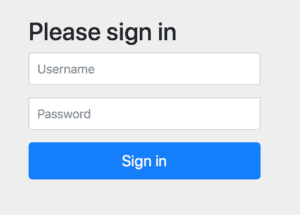
請注意,這不是一個生產級別的表單,但它是我們應用程序的一個良好的 Bootstrap
如果現在登錄,然後訪問 http://localhost:8080/logout URL,我們會看到登出確認表單,該表單也進行了樣式化。
5. 反應式控制器安全
為了查看身份驗證表單的背後的內容,讓我們實現一個簡單的反應式控制器,向用户問候:
@RestController
public class GreetingController {

    @GetMapping("/")
    public Mono<String> greet(Mono<Principal> principal) {
        return principal
          .map(Principal::getName)
          .map(name -> String.format("Hello, %s", name));
    }

}
登錄後,我們會看到問候語。讓我們添加一個僅對管理員可訪問的另一個反應式處理程序:
@GetMapping("/admin")
public Mono<String> greetAdmin(Mono<Principal> principal) {
    return principal
      .map(Principal::getName)
      .map(name -> String.format("Admin access: %s", name));
}
現在,讓我們在用户詳細信息服務中創建一個第二個用户,具有 ADMIN 角色:
UserDetails admin = User.withDefaultPasswordEncoder()
  .username("admin")
  .password("password")
  .roles("ADMIN")
  .build();
現在,我們可以為管理員 URL 添加一個匹配規則,要求用户具有 ROLE_ADMIN 權限。
請注意,必須在 .anyExchange() 調用之前放置匹配器。此調用適用於所有尚未由其他匹配器覆蓋的 URL:
return http.authorizeExchange(exchanges -> exchanges
  .pathMatchers("/admin").hasAuthority("ROLE_ADMIN")
  .anyExchange().authenticated())
  .formLogin(formLogin -> formLogin
    .loginPage("/login"))
  .csrf(csrf -> csrf.disable())
  .build();
如果現在使用 user 或 admin 用户登錄,我們將會看到他們都能觀察到初始問候語,因為我們已將其對所有已認證用户開放。
但只有 admin 用户才能訪問 http://localhost:8080/admin URL 並查看她的問候語
6. 反應式方法安全
我們已經看到如何安全地保護URL,但對於方法呢?
為了啓用反應式方法安全,我們只需要將 @EnableReactiveMethodSecurity 和 @Configuration 註解添加到我們的 SecurityConfig 類中:
@EnableWebFluxSecurity
@Configuration
@EnableReactiveMethodSecurity
public class SecurityConfig {
    // ...
}
現在讓我們創建一個具有以下內容的反應式問候服務:
@Service
public class GreetingService {

    public Mono<String> greet() {
        return Mono.just("Hello from service!");
    }
}
我們可以將其注入到控制器中,訪問 http://localhost:8080/greetingService,並查看它是否實際有效:
@RestController
public class GreetingController {

    private GreetingService greetingService

    // constructor...

    @GetMapping("/greetingService")
    public Mono<String> greetingService() {
        return greetingService.greet();
    }

}
但是,如果我們現在在服務方法上添加 @PreAuthorize 註解,並使用 ADMIN 角色,則 greet 服務 URL 將對普通用户不可訪問:
@Service
public class GreetingService {

    @PreAuthorize("hasRole('ADMIN')")
    public Mono<String> greet() {
        // ...
    }
}
7. 在測試中模擬用户讓我們看看如何輕鬆測試我們的反應式 Spring 應用程序。
首先,我們將創建一個帶有注入的應用程序上下文的測試:
@ContextConfiguration(classes = SpringSecurity6Application.class)
public class SecurityTest {

    @Autowired
    ApplicationContext context;

    // ...
}
現在,我們將設置一個簡單的反應式 Web 測試客户端,它是 Spring 5 測試框架的特性:
@Before
public void setup() {
    this.webTestClient = WebTestClient
      .bindToApplicationContext(this.context)
      .configureClient()
      .build();
}
這允許我們快速檢查未授權用户從應用程序的主頁重定向到登錄頁面:
@Test
void whenNoCredentials_thenRedirectToLogin() {
    webTestClient.get()
      .uri("/")
      .exchange()
      .expectStatus().is3xxRedirection();
}
如果我們在測試方法中添加了 @WithMockUser 註解,則可以為該方法提供經過身份驗證的用户。
此用户的登錄名和密碼為 user 和 password,角色為 USER。當然,所有這些都可以使用 @WithMockUser 註解參數進行配置。
現在我們可以檢查授權用户是否看到問候語:
@Test
@WithMockUser
void whenHasCredentials_thenSeesGreeting() {
    webTestClient.get()
      .uri("/")
      .exchange()
      .expectStatus().isOk()
      .expectBody(String.class).isEqualTo("Hello, user");
}
@WithMockUser 註解自 Spring Security 4 以來一直可用。但是,它在 Spring Security 5 中也得到了更新,以覆蓋反應式端點和方法。
8. 結論
在本教程中,我們發現了 Spring Security 的新功能,尤其是在響應式編程領域。

