
1. 概述
在本教程中,我們將涵蓋 Spring Cloud Netflix Hystrix – 容錯庫。我們將使用該庫並實現斷路器企業級模式,該模式描述了在應用程序的不同層次防止級聯故障的策略。
其原理類似於電子學:Hystrix 會監視方法在調用相關服務時出現的失敗情況。如果發生此類失敗,它將打開斷路器並將調用轉發到備用方法。
該庫將容忍失敗,直到達到閾值。超過該閾值,它將保持斷路器打開。這意味着,它將將所有後續調用轉發到備用方法,以防止未來的故障。這為相關的服務從其故障狀態中恢復提供了一個時間緩衝。
2. REST Producer
為了創建一個演示 Circuit Breaker 模式的場景,我們首先需要一個服務。我們將它命名為“REST Producer”,因為它為啓用了 Hystrix 的“REST Consumer”提供數據,我們將在下一步中創建該消費者。
讓我們使用 spring-boot-starter-web 依賴項創建一個新的 Maven 項目:
<dependency>
    <groupId>org.springframework.boot</groupId>
    <artifactId>spring-boot-starter-web</artifactId>
    <version>2.2.6.RELEASE</version>
</dependency>
項目本身被有意保持簡單。它由一個控制器接口和一個帶有 @RequestMapping 註解的 GET 方法,該方法簡單地返回一個 String,一個實現該接口的 @RestController 以及一個 @SpringBootApplication 組成。
我們先從接口開始:
public interface GreetingController {
    @GetMapping("/greeting/{username}")
    String greeting(@PathVariable("username") String username);
}
以下是實現方式:
@RestController
public class GreetingControllerImpl implements GreetingController {

    @Override
    public String greeting(@PathVariable("username") String username) {
        return String.format("Hello %s!\n", username);
    }
}
接下來,我們將編寫主應用程序類:
@SpringBootApplication
public class RestProducerApplication {
    public static void main(String[] args) {
        SpringApplication.run(RestProducerApplication.class, args);
    }
}
為了完成本節,唯一需要做的就是配置一個應用程序端口,我們將在此端口上監聽。 我們不會使用默認端口 8080,因為該端口應保留供下一步驟中描述的應用程序使用。
此外,我們還定義了一個應用程序名稱,以便從稍後介紹的客户端應用程序中查找我們的生產者。
然後,我們將在 application.properties 文件中指定端口 9090 和名稱 rest-producer 。
server.port=9090
spring.application.name=rest-producer
現在我們可以使用 cURL 測試我們的生產者:
$> curl http://localhost:9090/greeting/Cid
Hello Cid!
3. 使用 Hystrix 的 REST 消費者
為了我們的演示場景,我們將實現一個 Web 應用程序,該應用程序將使用 RestTemplate 和 Hystrix 從前一步的 REST 服務中進行消費。為了簡化起見,我們將它稱為“REST 消費者”。
因此,我們創建一個新的 Maven 項目,其中包含 spring-cloud-starter-hystrix、spring-boot-starter-web 和 spring-boot-starter-thymeleaf 作為依賴項:
<dependency>
    <groupId>org.springframework.cloud</groupId>
    <artifactId>spring-cloud-starter-hystrix</artifactId>
    <version>1.4.7.RELEASE</version>
</dependency>
<dependency>
    <groupId>org.springframework.boot</groupId>
    <artifactId>spring-boot-starter-web</artifactId>
    <version>2.2.6.RELEASE</version>
</dependency>
<dependency>
    <groupId>org.springframework.boot</groupId>
    <artifactId>spring-boot-starter-thymeleaf</artifactId>
    <version>2.2.6.RELEASE</version>
</dependency>
為了使斷路器正常工作,Hystix 將掃描 @Component 或 @Service 註解的類中帶有 @HystixCommand 註解的方法,並實現代理,監視其調用。
我們將首先創建一個 @Service 類,該類將被注入到 @Controller 中。由於我們正在使用 Thymeleaf 構建 Web 應用程序,因此還需要一個 HTML 模板,用作視圖。
這將是我們的可注入 @Service 類,它將實現一個 @HystrixCommand,並與關聯的備用方法一起使用。該備用方法必須具有與原始方法相同的簽名:
@Service
public class GreetingService {
    @HystrixCommand(fallbackMethod = "defaultGreeting")
    public String getGreeting(String username) {
        return new RestTemplate()
          .getForObject("http://localhost:9090/greeting/{username}",
          String.class, username);
    }

    private String defaultGreeting(String username) {
        return "Hello User!";
    }
}
RestConsumerApplication 將作為我們的主應用程序類。@EnableCircuitBreaker 註解將掃描類路徑以查找任何兼容的 Circuit Breaker 實現。
為了顯式地使用 Hystrix,我們必須使用 @EnableHystrix 註解對該類進行標註:
@SpringBootApplication
@EnableCircuitBreaker
public class RestConsumerApplication {
    public static void main(String[] args) {
        SpringApplication.run(RestConsumerApplication.class, args);
    }
}
我們將會使用我們的 GreetingService 設置控制器:
@Controller
public class GreetingController {

    @Autowired
    private GreetingService greetingService;

    @GetMapping("/get-greeting/{username}")
    public String getGreeting(Model model, @PathVariable("username") String username) {
        model.addAttribute("greeting", greetingService.getGreeting(username));
        return "greeting-view";
    }
}
以下是 HTML 模板:
<!DOCTYPE html>
<html xmlns:th="http://www.thymeleaf.org">
    <head>
        <title>Greetings from Hystrix</title>
    </head>
    <body>
        <h2 th:text="${greeting}"/>
    </body>
</html>
為了確保應用程序監聽指定的端口,我們在 application.properties文件中添加了以下內容:
server.port=8080為了觀察 Hystix 斷路器的工作原理,我們首先啓動消費者,並將瀏覽器的目標地址指向 http://localhost:8080/get-greeting/Cid。 在正常情況下,將會顯示以下內容:
Hello Cid!為了模擬生產者的故障,我們只需停止它。在刷新瀏覽器後,我們應該看到來自我們服務層面的備用方法返回的通用消息,該方法標記為@Service:
Hello User!4. 使用 Hystrix 和 Feign 的 REST 消費者
現在,我們將修改上一步驟的項目,使用 Spring Netflix Feign 作為聲明式的 REST 客户端,而不是 Spring RestTemplate。
這樣做的好處是我們稍後可以輕鬆地重構我們的 Feign 客户端接口,以使用 Spring Netflix Eureka 進行服務發現。
為了啓動新項目,我們將複製我們的消費者,並添加我們的生產者和 spring-cloud-starter-feign 作為依賴項:
<dependency>
    <groupId>com.baeldung.spring.cloud</groupId>
    <artifactId>spring-cloud-hystrix-rest-producer</artifactId>
    <version>1.0.0-SNAPSHOT</version>
</dependency>
<dependency>
    <groupId>org.springframework.cloud</groupId>
    <artifactId>spring-cloud-starter-feign</artifactId>
    <version>1.1.5.RELEASE</version>
</dependency>
現在,我們可以使用我們的 GreetingController 來擴展一個 Feign Client。我們將 Hystrix 回退作為靜態內部類實現,並使用 @Component 註解。
或者,我們可以定義一個 @Bean 註解的方法,返回該回退類的實例。
@FeignClient 的 name 屬性是必填的。它用於通過 Eureka Client 進行服務發現,或者當此屬性提供時,通過 URL 查找應用程序。
@FeignClient(
  name = "rest-producer"
  url = "http://localhost:9090",
  fallback = GreetingClient.GreetingClientFallback.class
)
public interface GreetingClient extends GreetingController {

    @Component
    public static class GreetingClientFallback implements GreetingController {

        @Override
        public String greeting(@PathVariable("username") String username) {
            return "Hello User!";
        }
    }
}
要了解更多關於使用 Spring Netflix Eureka 進行服務發現的信息,請參考本文。
在 RestConsumerFeignApplication 中,我們將添加額外的註解以啓用 Feign 集成,實際上是 @EnableFeignClients,添加到主應用程序類中:
@SpringBootApplication
@EnableCircuitBreaker
@EnableFeignClients
public class RestConsumerFeignApplication {

    public static void main(String[] args) {
        SpringApplication.run(RestConsumerFeignApplication.class, args);
    }
}
我們將會修改控制器,使用自動注入的 Feign 客户端,而不是之前注入的 @Service,以獲取我們的問候語:
@Controller
public class GreetingController {
    @Autowired
    private GreetingClient greetingClient;

    @GetMapping("/get-greeting/{username}")
    public String getGreeting(Model model, @PathVariable("username") String username) {
        model.addAttribute("greeting", greetingClient.greeting(username));
        return "greeting-view";
    }
}
為了將此示例與之前的示例區分開來,我們將更改應用程序監聽端口,在 application.properties 文件中:
server.port=8082最後,我們將測試這個啓用了 Feign 的消費者,就像上一節中提到的那個消費者一樣。 預期結果應該相同。
5. 使用 Hystrix 進行緩存回退
現在,我們將向我們的 Spring Cloud 項目中添加 Hystrix。 在這個雲項目中,我們有一個評分服務,它與數據庫通信並獲取書籍的評分。
假設我們的數據庫是一個受併發請求影響的資源,其響應延遲可能會隨時間變化,或者在某些時間點可能不可用。 我們將使用 Hystrix 斷路器,通過緩存回退來處理這種情況。
5.1. 部署與配置
讓我們將 <a href="https://mvnrepository.com/artifact/org.springframework.cloud/spring-cloud-starter-hystrix">spring-cloud-starter-hystrix</a> 依賴項添加到我們的評分模塊中:
<dependency>
    <groupId>org.springframework.cloud</groupId>
    <artifactId>spring-cloud-starter-hystrix</artifactId>
</dependency>當評分插入/更新/刪除時,我們將通過Repository將其複製到 Redis 緩存。要了解更多關於 Redis 的信息,請查看這篇文章。
讓我們更新RatingService,使其將數據庫查詢方法包裝在 Hystrix 命令中使用@HystrixCommand,並配置它包含從 Redis 讀取的備用方案:
@HystrixCommand(
  commandKey = "ratingsByIdFromDB",
  fallbackMethod = "findCachedRatingById",
  ignoreExceptions = { RatingNotFoundException.class })
public Rating findRatingById(Long ratingId) {
    return Optional.ofNullable(ratingRepository.findOne(ratingId))
      .orElseThrow(() ->
        new RatingNotFoundException("Rating not found. ID: " + ratingId));
}

public Rating findCachedRatingById(Long ratingId) {
    return cacheRepository.findCachedRatingById(ratingId);
}
請注意,回退方法應與被包裹的方法具有相同的簽名,並且必須位於同一類中。當 findRatingById 失敗或延遲超過給定閾值時,Hystrix 會回退到 findCachedRatingById.
由於 Hystrix 功能以 AOP 建議形式透明地注入,因此我們需要調整建議的堆疊順序,以防我們有其他建議,例如 Spring 的事務建議。在這裏,我們已將 Spring 的事務 AOP 建議設置為優先級低於 Hystrix AOP 建議。
@EnableHystrix
@EnableTransactionManagement(
  order=Ordered.LOWEST_PRECEDENCE,
  mode=AdviceMode.ASPECTJ)
public class RatingServiceApplication {
    @Bean
    @Primary
    @Order(value=Ordered.HIGHEST_PRECEDENCE)
    public HystrixCommandAspect hystrixAspect() {
        return new HystrixCommandAspect();
    }

    // other beans, configurations
}
在這裏,我們調整了 Spring 的事務 AOP 建議優先級,使其低於 Hystrix AOP 建議優先級。
5.2. 測試 Hystrix 回退
現在我們已經配置了斷路器,可以通過讓與我們的存儲庫交互的 H2 數據庫下線來對其進行測試。但是首先,讓我們以外部進程的形式運行 H2 實例,而不是將其作為嵌入式數據庫運行。
讓我們將 H2 庫(h2-1.4.193.jar)複製到已知目錄,並啓動 H2 服務器:
>java -cp h2-1.4.193.jar org.h2.tools.Server -tcp
TCP server running at tcp://192.168.99.1:9092 (only local connections)
現在,讓我們更新模塊的數據源 URL,在 rating-service.properties 文件中指向這個 H2 服務器:
spring.datasource.url = jdbc:h2:tcp://localhost/~/ratings我們可以從我們上一篇 Spring Cloud 系列文章中提供的服務開始,通過將我們正在運行的外部 H2 實例降低,對每本書的評分進行測試。
當 H2 數據庫不可訪問時,Hystrix 會自動回退到 Redis 讀取每本書的評分。該用例的代碼演示可以在 這裏找到。
6. 使用 Scopes
通常,帶有 @HytrixCommand 註解的方法會在線程池上下文中執行。但是,有時需要在一個本地作用域中運行,例如使用 @SessionScope 或 @RequestScope。可以通過向命令註解傳遞參數來實現:
@HystrixCommand(fallbackMethod = "getSomeDefault", commandProperties = {
  @HystrixProperty(name = "execution.isolation.strategy", value = "SEMAPHORE")
})
7. Hystrix 儀表盤
Hystrix 的一個不錯的可選功能是能夠通過儀表盤監控其狀態。
要啓用它,我們將把 spring-cloud-starter-hystrix-dashboard 和 spring-boot-starter-actuator 添加到我們的消費者 pom.xml 中:
<dependency>
    <groupId>org.springframework.cloud</groupId>
    <artifactId>spring-cloud-starter-hystrix-dashboard</artifactId>
    <version>1.4.7.RELEASE</version>
</dependency>
<dependency>
    <groupId>org.springframework.boot</groupId>
    <artifactId>spring-boot-starter-actuator</artifactId>
    <version>2.2.6.RELEASE</version>
</dependency>
前一種方式需要通過註解一個 @Configuration 並使用 @EnableHystrixDashboard 啓用。 後一種方式則會自動在我們的 Web 應用程序中啓用所需的指標。
在重啓應用程序後,請在瀏覽器中訪問 http://localhost:8080/hystrix,輸入 Hystrix 流的指標 URL,並開始監控。
最終,您應該看到類似下面的內容:
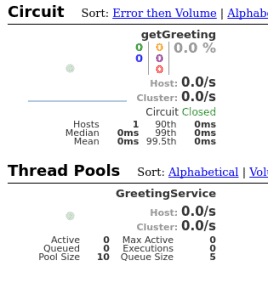
監控一個 Hystrix 流是很方便,但如果需要監控多個啓用了 Hystrix 的應用程序,將會變得不便。 為了解決這個問題,Spring Cloud 提供了名為 Turbine 的工具,它可以聚合流並呈現在一個 Hystrix 儀表盤中。
配置 Turbine 超出本文檔的範圍,但這裏值得一提。 因此,還可以通過使用 Turbine 流,通過消息傳遞收集這些流。
8. 結論
如前所述,我們現在能夠使用 Spring Netflix Hystrix 與 Spring RestTemplate 或 Spring Netflix Feign 結合,實現斷路器模式。
這意味着我們可以使用包含默認數據的降級方案來消費服務,並且可以監控這些數據的利用情況。

