
1. 概述
在 Web 應用程序中創建模態對話框是一種常見的用户交互需求,例如顯示錶單、確認操作或呈現信息。在 Spring 應用程序中使用 Thymeleaf 時,將動態數據傳遞到模態對話框可以顯著增強用户交互性。
在本文中,我們將逐步介紹如何在 Thymeleaf 中實現模態對話框並將其傳遞一個對象。
2. Maven 依賴
在開始之前,請確保 Thymeleaf 已正確配置在我們的 Spring MVC 應用程序中。我們需要在 pom.xml 文件中包含 thymeleaf 和 thymeleaf-spring5 依賴:
<dependency>
    <groupId>org.thymeleaf</groupId>
    <artifactId>thymeleaf</artifactId>
    <version>3.1.2.RELEASE</version>
</dependency>
<dependency>
    <groupId>org.thymeleaf</groupId>
    <artifactId>thymeleaf-spring5</artifactId>
    <version>3.1.2.RELEASE</version>
</dependency>
這些依賴項允許 Spring MVC 處理 Thymeleaf 視圖並無縫地渲染動態內容
3. 定義數據模型
接下來,讓我們定義一個 <em >Book</em> 模型類。該類將代表我們想要傳遞到模態對話框的數據。它包含諸如 <em >id</em> 和 <em >name</em> 這樣的屬性,這些屬性將被用於顯示有關每本書的相關信息:
public class Book {
    private int id;
    private String name;

    // constructor
    // getters and setters
}
4. 創建控制器
現在,讓我們實現一個 Spring 控制器,準備一個包含 Book 對象列表,並將它們傳遞給 Thymeleaf 視圖。 此控制器將處理請求並使書的數據可供模板使用:
@GetMapping("/listBooksWithModal")
public String listBooks(Model model) {
    List<Book> books = new ArrayList<>();
    books.add(new Book(1, "Book 1"));
    books.add(new Book(1, "Book 2"));
    books.add(new Book(1, "Book 2"));
    model.addAttribute("books", books);
    return "listBooksWithModal.html";
}
listBooks() 方法準備一個 Book 對象列表並將其添加到模型中,從而使列表可供 listBooksWithModal.html 模板訪問。
5. 創建 Thymeleaf 模板
現在,讓我們重點關注將顯示書籍列表並在用户點擊“<emView Details”按鈕時打開模態對話框的 Thymeleaf 模板。
在模板中,我們將 <emBook 對象傳遞給模態對話框,該對話框顯示書籍的 ID 和名稱等詳細信息:
<!DOCTYPE html>
<html xmlns:th="http://www.thymeleaf.org">
<head>
    <title>Book List with Modals</title>
</head>
<body>

<div>
    <h1>Book List</h1>
    <table border="1">
        <thead>
        <tr>
            <th>Book ID</th>
            <th>Book Name</th>
            <th>Action</th>
        </tr>
        </thead>
        <tbody>
        <tr th:each="book : ${books}">
            <td th:text="${book.id}"></td>
            <td th:text="${book.name}"></td>
            <td>
                <!-- Button to open modal for the selected book -->
                <button th:attr="onclick=|showModal('infoModal' + ${book.id})|">View Details</button>
            </td>
        </tr>
        </tbody>
    </table>
</div>

<!-- Modal template for each book -->
<div th:each="book : ${books}" th:attr="id=${'infoModal' + book.id}" style="display: none;">
    <div>
        <h3>Book Details</h3>
        <p><strong>ID:</strong> <span th:text="${book.id}"></span></p>
        <p><strong>Name:</strong> <span th:text="${book.name}"></span></p>
        <button th:attr="onclick=|hideModal('infoModal' + ${book.id})|">Close</button>
    </div>
</div>

<script>
    function showModal(modalId) {
        document.getElementById(modalId).style.display = 'block';
    }

    function hideModal(modalId) {
        document.getElementById(modalId).style.display = 'none';
    }
</script>

</body>
</html>
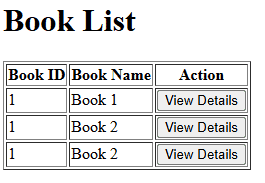
該模板以表格形式顯示書籍列表,每行對應一本書。這種結構允許用户輕鬆查看每本書的基本信息,例如其 ID 和名稱。此外,每本書都包含一個“查看詳情”按鈕。點擊該按鈕會觸發模態框顯示所選書籍的詳細信息。
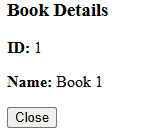
模態框內部,Thymeleaf 的 th:text 屬性動態填充內容。當用户點擊特定書籍的“查看詳情”按鈕時,模態框會顯示該書籍的正確詳情,例如其 ID 和名稱。服務器通過模型生成模態框 ID,Thymeleaf 渲染內容,並將其綁定到模態框的 HTML 元素。
此外,我們為每個模態框分配一個唯一的 ID,基於書籍 ID。這確保了用户與“查看詳情”按鈕交互時,正確的模態框會顯示出來。模態框 ID 採用動態生成格式 infoModal{id},其中 {id} 被替換為實際的書籍 ID。因此,對於選定的書籍對象,會顯示正確的模態框。
總而言之,該模板結構有助於用户與書籍列表進行交互。他們可以在不離開頁面的情況下查看每本書的詳細信息,從而實現流暢高效的用户體驗。
6. 結果
本節將展示渲染後的模板,以説明 Thymeleaf 模板在實際應用中的效果。表格列出了書籍信息,每行顯示書籍的 ID、名稱和“查看詳情”按鈕:
當用户點擊按鈕時,模態對話框將顯示所選書籍的詳細信息:
7. 結論
本文演示瞭如何在 Spring MVC 應用程序中使用 Thymeleaf 將對象傳遞到模態對話框的方法。通過為每個對象創建獨特的模態對話框並利用 Thymeleaf 的動態數據綁定功能,我們能夠將相關內容傳遞到模態對話框並以交互方式顯示它。

