1. 簡介
OpenAPI規範(前身為Swagger規範)標準化了REST API文檔語言,並且具有平台無關性。我們可以創建OpenAPI文檔,格式為YAML或JSON。
另一方面,Swagger是一個用於實施和使用該標準的工具集合。其中一些是免費的,一些是開源的,一些是商業的。這些工具幫助我們設計、文檔和消費REST API。
在本文中,我們將學習如何在OpenAPI文檔中格式化文本描述。
2. OpenAPI 編輯器
有多種工具可以幫助我們創建 OpenAPI 文檔。以下是一些流行的工具:
還有許多其他編輯器可以幫助創建 OpenAPI 文檔。但是,Swagger Editor 是最受歡迎和廣泛使用的編輯器。因此,我們將使用 Swagger Editor 來格式化我們的 OpenAPI 文檔。
3. YAML 與 JSON 格式化
OpenAPI 文檔以 JSON 或 YAML 格式表示。 但是,使用 YAML 時,格式化文檔非常簡單直接。
例如,要標記一個單詞或句子為標題,我們在 YAML 中使用以下片段:
 description: |
    # This is a heading in *italics*
    This is in the next line

    This is in **bold**
YAML 表示形式使用 | (管道符) 表示標量字面量,它可以是多行的。
現在,讓我們在 JSON 中定義相同的內容:
{
    "description": "# This is a heading in *italics*\nThis is in the next line\n\nThis is in **bold**
}
相比之下,在 JSON 表示形式中,轉義序列使格式化變得不直觀。 因此,我們將只關注 OpenAPI 規範中以 YAML 編寫的文檔的格式化技術。
最後,OpenAPI 規範允許在所有級別格式化 description 字段。 因此,根據規範,只要 description 字段允許,我們就可以格式化它,並且 description 字段符合 CommonMark 格式化 風格。
現在,讓我們通過格式化我們的 API 文檔來增強它們。
4. 標題
正如我們在 HTML 中使用 <h1> 到 <h6> 來創建標題一樣,我們也可以使用 Markdown 標題來突出顯示文本。 一個 # 代表一個標題。 # 可以最多達到六級,用於強調文本。 數字 # 越多,文本的強調程度就越低。
一個文本後面跟着 # 更加醒目和更大,而一個文本伴隨 ###### 則不然。
例如,考慮 YAML:
openapi: 3.0.1
info:
  title: Petstore
  description: |
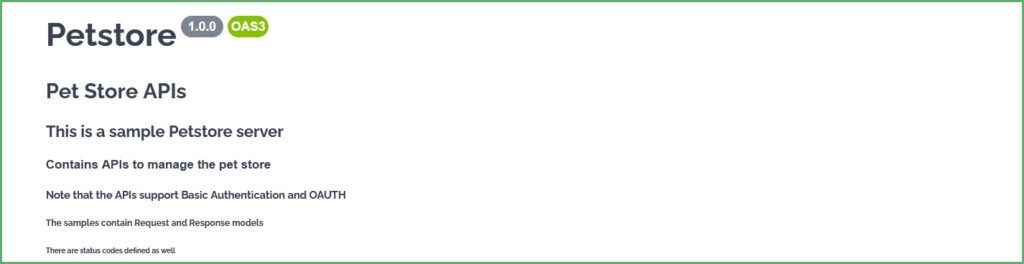
    # Pet Store APIs
    ## This is a sample Petstore server
    ### Contains APIs to manage the pet store
    #### Note that the APIs support Basic Authentication and OAUTH
    ##### The samples contain Request and Response models
    ###### There are status codes defined as well
Swagger 渲染文本如下:
5. 文本強調
為了提高描述的易讀性,我們可以通過將其設置為粗體或斜體來強調它。
在文本中用 和 和 之間放置的文本會加粗, 同樣,在 和 和 文本會斜體。
openapi: 3.0.1
info:
  title: Petstore
  description: |
    ## This document contains

    **Pet Store APIs** *Note: All the APIs return application/json*.
    __User APIs__ _Note: These APIs contain attachments and only support image/jpeg as the content type_
Swagger 渲染的 YAML 如下:

6. 表格
接下來,讓我們看看如何將表格添加到 OpenAPI 文檔中。
渲染表格需要遵循一套規則。首先,表格中的每一列都應以和以 | (豎線) 符號開頭和結尾。其次,用至少一個 – (短橫線) 符號分隔表格的表頭。但是,最大數量沒有限制 – (短橫線) 。
例如,讓我們添加一個表格來定義 POST API 的 HTTP 狀態碼:
paths:
  /pet:
    post:
      tags:
      - pet
      description: |

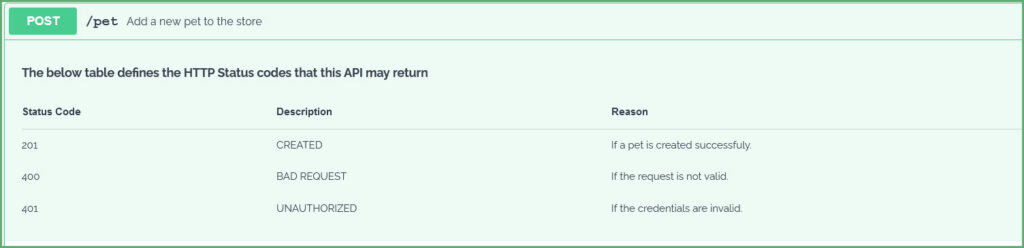
        **下面的表格定義了此 API 可能返回的 HTTP 狀態碼**

        | 狀態碼      | 描述       | 原因                             |
        | ---------------- | ------------| -----------------------------------|
        | 201              | CREATED     | 如果寵物創建成功。   |
        | 400              | BAD REQUEST | 如果請求無效。       |
        | 401              | UNAUTHORIZED| 如果憑據無效。    |
Swagger 生成:
7. Lists
Now, let’s see how to format the description text to contain lists.
7.1. Ordered List
The description text items should start with a number followed by a period ( . ). However, the numbering order of the items isn’t essential. That is, the snippets:
description: |
  1. Available
  3. Pending
  1. Sold
description: |
1. Available
200. Pending
30. Solddescription: |
1. Available
100. Pending
50. Soldgenerate the same output:
1. Available
2. Pending
3. Sold
The numbering of the items depends on the starting item. For instance, if we start the item number with 10, the following items will be numbered 11, 12, 13, etc. The below YAML:
description: |
  10. Available
  120. Pending
  50. Sold
generates:
10. Available
11. Pending
12. Sold
Similarly, the same rules apply for ordered sub-lists as well. Indent a sub-list to its parent item. As an example, consider the YAML:
description: |
  1. Available
  2. Pending
     1. Pending in Store
     200. Pending in Cart
  3. Sold
which generates:
1. Available
2. Pending
    1. Pending in Store
    2. Pending in Cart
3. Sold
7.2. Unordered List
Use * (asterisks) or + (plus) or a – (hyphen) to create an unordered list. That is, each item in the list should begin with one of these symbols. For example:
description: |
  * Available
  * Pending
  * Sold

description: |
  + Available
  + Pending
  + Sold

description: |
  - Available
  - Pending
  - Sold
all the above snippets generate an unordered list.
Similarly, to generate unordered sub-lists, indent the items with their parent item and start with a * (asterisks) or + (plus) or a – (hyphen). For instance, the YAML:
- Available
- Pending
   * Pending in Store
   + Pending in Cart
- Sold
generates an unordered list with a sub-list. Note the mix and match of the delimiters. It is possible to mix the delimiters, which create the same results.
Finally, let’s place all this together into a YAML:
/pet/findByStatus:
   get:
     summary: Finds Pets by status
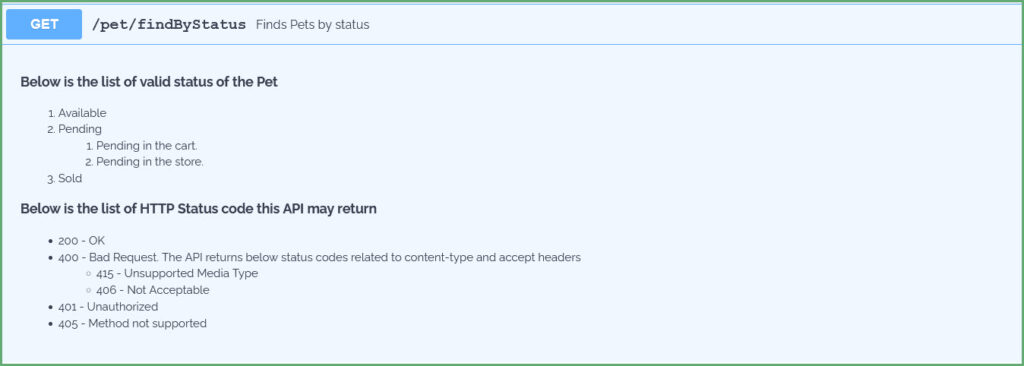
     description: |
       __Below is the list of valid status of the Pet__

       1. Available
       2. Pending
          1. Pending in the cart
          2. Pending in the store
       3. Sold

       **Below is the list of HTTP Status code this API may return**
       * 200 - OK
       * 400 - Bad Request. The API returns below status codes related to content-type and accept headers
         + 415 - Unsupported Media Type
         - 406 - Not Acceptable
       * 401 - Unauthorized
       * 405 - Method not supported
This YAML generates:
8. Miscellaneous
8.1. Line Breaks and Paragraphs
description: |
  Returns a single pet.
  *Note: The API may throw a HTTP 404 if there are no pets found with a given id.*

  The API returns a 200 OK if there is a pet with given Id. Also, this API returns the status of the pet
description: |
  The API returns user details for a given username.
  The API can be invoked using *curl* like below:

  curl --header accept: application/json -u username:password http://localhost:8080/api/v2/user/jhondoe

  **Sample Output**

  {
    "id": 2,
    "username": "jhondoe"
    "email": "[email protected]"
  }
description: |
# Pet Store APIs