
1. 概述
跨域資源共享 (CORS) 是一種瀏覽器應用程序的安全機制,允許一個域的網頁訪問另一個域的資源。瀏覽器實施相同的原域訪問策略,以限制跨域應用程序的訪問。
Spring 也提供了對配置 CORS 的一流支持,適用於任何 Spring、Spring Boot Web 和 Spring Cloud gateway 應用程序。
在本文中,我們將學習如何使用 Spring Cloud Gateway 應用程序與後端 API 集成。 此外,我們還將訪問網關 API 並調試常見的 CORS 相關錯誤。
然後,我們將配置 Spring 網關 API,並利用 Spring CORS 支持。
2. 使用 Spring Cloud Gateway 實施 API 網關
假設我們需要構建一個 Spring Cloud 網關服務,以暴露後端 REST API。
2.1. 實現後端 REST API
我們的後端應用程序將具有一個端點,用於返回 User 數據。
首先,讓我們對 User 類進行建模:
public class User {
    private long id;
    private String name;

    //standard getters and setters
}
接下來,我們將實現 UserController,並使用 getUser 端點:
@GetMapping(path = "/user/{id}")
public User getUser(@PathVariable("id") long userId) {
    LOGGER.info("Getting user details for user Id {}", userId);
    return userMap.get(userId);
}
2.2. 實現 Spring Cloud Gateway 服務
現在,我們將使用 Spring Cloud Gateway 支持實現一個 API 網關服務。
首先,我們將包含 spring-cloud-starter-gateway 依賴項:
<dependency>
    <groupId>org.springframework.cloud</groupId>
    <artifactId>spring-cloud-starter-gateway</artifactId>
    <version>4.1.5</version
</dependency>
2.3. 配置 API 路由
我們可以使用 Spring Cloud Gateway 的路由選項來暴露 User 服務端點。
我們將配置 謂詞(predicates)到 /user 路徑,並將 uri 屬性設置為後端 URI:http://
spring:
  cloud:
    gateway:
      routes:
        -  id: user_service_route
           predicates:
             - Path=/user/**
           uri: http://localhost:8081
3. 測試 Spring Gateway API
現在我們將使用 cURL 命令和瀏覽器窗口從終端測試 Spring Gateway 服務。
3.1. 使用 cURL 測試網關 API
讓我們運行用户服務和網關服務:
$ java -jar ./spring-backend-service/target/spring-backend-service-1.0.0-SNAPSHOT.jar$ java -jar ./spring-cloud-gateway-service/target/spring-cloud-gateway-service-1.0.0-SNAPSHOT.jar現在,讓我們使用網關服務 URL 訪問 /user 端點:
$ curl -v 'http://localhost:8080/user/100001'< HTTP/1.1 200 OK
< Content-Type: application/json
{"id":100001,"name":"User1"}我們已如上所述測試,成功獲取後端API響應。
3.2. 使用瀏覽器控制枱進行測試
為了在瀏覽器環境中進行實驗,我們將打開我們的前端應用程序,例如 https://www.baeldung.com/,並使用瀏覽器的支持的開發者工具選項。
我們將使用 Javascript 的 fetch 函數,從不同的源 URL 調用 API:
fetch("http://localhost:8080/user/100001")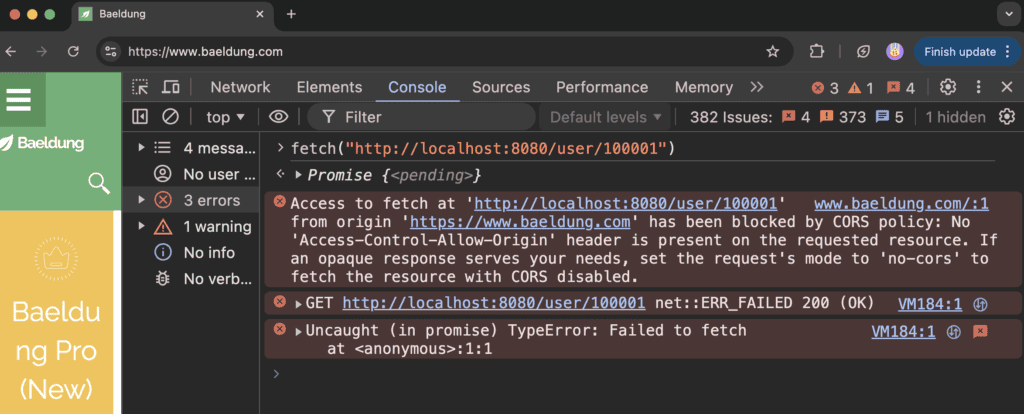
如上所示,API 請求由於 CORS 錯誤失敗。
我們將進一步在瀏覽器的網絡標籤頁中調試 API 請求:
OPTIONS /user/100001 HTTP/1.1
Access-Control-Request-Method: GET
Access-Control-Request-Private-Network: true
Connection: keep-alive
Host: localhost:8080
Origin: https://www.baeldung.com
另外,讓我們驗證一下API響應:
HTTP/1.1 403 Forbidden
...
content-length: 0
上述請求失敗,因為網頁 URL 的方案、域名和端口與網關 API 不同。瀏覽器期望服務器包含 Access-Control-Allow-Origin 標頭,但卻收到錯誤。
默認情況下,Spring 會在預檢 OPTIONS 請求中返回 Forbidden 錯誤(403),因為源不同。
接下來,我們將通過使用 Spring Cloud gateway 支持的 CORS 配置 來解決此錯誤。
4. 在 API 網關中配置 CORS 策略
我們將配置 CORS 策略,允許不同源訪問網關 API。
讓我們使用 globalcors 屬性配置 CORS 訪問策略:
spring:
  cloud:
    gateway:
      globalcors:
        corsConfigurations:
          '[/**]':
            allowedOrigins: "https://www.baeldung.com"
            allowedMethods:
              - GET
allowedHeaders: "*"我們應注意,全局 CORS 策略將應用於所有路由端點。
或者,我們可以按 API 路由配置 CORS 策略:
spring:
  cloud:
    gateway:
      routes:
        -  id: user_service_route
           ....
           metadata:
             cors:
               allowedOrigins: 'https://www.baeldung.com,http://localhost:3000'
               allowedMethods:
                 - GET
                 - POST
               allowedHeaders: '*'
allowedOrigins 字段可以配置為特定的域名,或用逗號分隔的域名列表,或設置為通配符 * 以允許任何跨域請求。 同樣,allowedMethods 和 allowedHeaders 屬性也可以配置為特定的值或通配符。
此外,我們還可以使用allowedOriginsPattern配置,以提供更靈活的跨域模式匹配。
allowedOriginPatterns:
  - https://*.example1.com
  - https://www.example2.com:[8080,8081]
  - https://www.example3.com:[*]
與 allowedOrigins 屬性不同, allowedOriginsPattern 允許在 URL 的任何部分(包括方案、域名和端口號)中使用通配符進行模式匹配。此外,我們還可以指定方括號內的逗號分隔的端口號。但是,allowedOriginsPattern 屬性不支持任何正則表達式。
現在,讓我們在瀏覽器的控制枱中重新驗證用户 API:
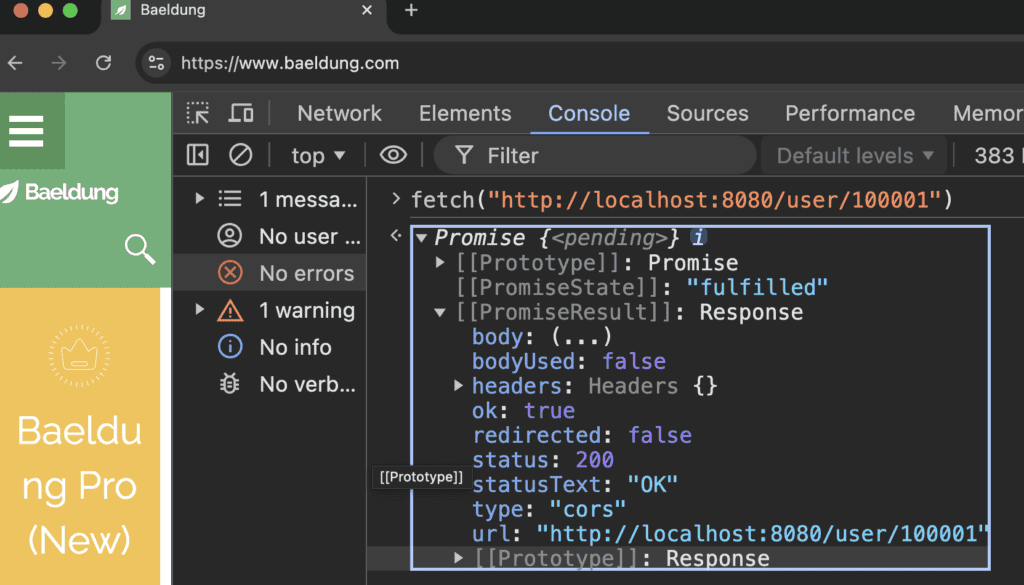
我們現在從 API 網關處收到一個 HTTP 200 響應。
此外,讓我們確認 OPTIONS API 響應中的 Access-Control-Allow-Origin 標頭:
HTTP/1.1 200 OK
...
Access-Control-Allow-Origin: https://www.baeldung.com
Access-Control-Allow-Methods: GET
content-length: 0
我們應該注意的是,建議配置有限的允許來源集以提供最高級別的安全性。
默認情況下,CORS規範不允任何 Cookie 或 CSRF 令牌在跨域請求中。但是,我們可以通過將 allowedCredentials 屬性設置為 true 來啓用它。此外,allowedCredentials 在使用 * 通配符時,在 allowedOrigins 和 allowedHeaders 屬性中無效。
5. 結論
在本文中,我們學習瞭如何使用 Spring Cloud gateway 支持實現 Gateway 服務。我們還遇到了在瀏覽器控制枱中測試 API 時常見的 CORS 錯誤。
最後,我們演示瞭如何通過配置應用程序的 <em allowedOrigins 和 <em allowedMethods 屬性來解決 CORS 錯誤。

