1. 概述
在本教程中,我們將討論 什麼是 HAL 以及它為什麼有用,然後再介紹 HAL 瀏覽器。
然後,我們將使用 Spring 構建一個簡單的 REST API,其中包含一些有趣的端點,並使用一些測試數據填充我們的數據庫。
最後,使用 HAL 瀏覽器,我們將探索我們的 REST API 並瞭解如何遍歷其中包含的數據。
2. HAL 和 HAL 瀏覽器
JSON Hypertext Application Language,或 HAL,是一種簡單格式,提供了一種一致且易於鏈接 API 中資源的便捷方式。 將 HAL 集成到我們的 REST API 中,使得它對用户來説更加易於探索,並且本質上具有自我文檔功能。
它通過返回 JSON 格式的數據來工作,該數據概述了有關 API 的相關信息。
HAL 模型圍繞着兩個基本概念展開
資源,包含:
- 指向相關 URI 的鏈接
- 嵌入式資源
- 狀態
鏈接:
- 目標 URI
- 鏈接的 relation(或 rel)
- 一些可選屬性,用於處理過時、內容協商等
HAL 瀏覽器是由開發 HAL 的同一人創建的,提供了一個瀏覽器內 GUI,用於遍歷您的 REST API
現在我們將構建一個簡單的 REST API,插入 HAL 瀏覽器,並探索其功能。
3. 依賴項
以下是用於將 HAL 瀏覽器集成到我們的 REST API 所需的單個依賴項。
首先,對於 Maven 類型的項目,請使用以下依賴項:
<dependency>
    <groupId>org.springframework.data</groupId>
    <artifactId>spring-data-rest-hal-explorer</artifactId>
    <version>3.4.1.RELEASE</version>
</dependency>
如果您使用 Gradle 構建,可以在您的 build.gradle 文件中添加以下行:
compile group: 'org.springframework.data', name: 'spring-data-rest-hal-explorer', version: '3.4.1.RELEASE'4. 構建一個簡單的 REST API
4.1. 簡單的數據模型
在我們的示例中,我們將設置一個簡單的 REST API,用於瀏覽我們圖書館中的不同書籍。
這裏,我們定義了一個簡單的書籍實體,其中包含適當的註解,以便我們使用 Hibernate 持久化數據:
@Entity
public class Book {

  @Id
  @GeneratedValue(strategy = GenerationType.IDENTITY)
  private long id;

  @NotNull
  @Column(columnDefinition = "VARCHAR", length = 100)
  private String title;

  @NotNull
  @Column(columnDefinition = "VARCHAR", length = 100)
  private String author;

  @Column(columnDefinition = "VARCHAR", length = 1000)
  private String blurb;

  private int pages;

  // usual getters, setters and constructors

}
4.2. 介紹一個 CRUD 倉庫
接下來,我們需要一些端點。為此,我們可以利用PagingAndSortingRepository並指定我們想要從我們的Book實體中獲取數據。
此類提供簡單的 CRUD 命令,以及分頁和排序功能,而且一應俱全:
@Repository
public interface BookRepository extends PagingAndSortingRepository<Book, Long> {

    @RestResource(rel = "title-contains", path="title-contains")
    Page<Book> findByTitleContaining(@Param("query") String query, Pageable page);

    @RestResource(rel = "author-contains", path="author-contains", exported = false)
    Page<Book> findByAuthorContaining(@Param("query") String query, Pageable page);
}
如果這看起來有點奇怪,或者您想了解更多關於 Spring 倉庫的信息,可以在這裏找到更多信息。
我們通過添加兩個新的端點擴展了倉庫:
- findByTitleContaining – 返回包含查詢的標題中的書籍
- findByAuthorContaining – 返回數據庫中作者包含查詢的圖書
請注意,我們的第二個端點包含export = false屬性。此屬性阻止 HAL 鏈接為該端點生成,並且不會通過 HAL 瀏覽器可用。
最後,我們將在 Spring 啓動時通過定義實現ApplicationRunner接口的類加載數據。您可以在 GitHub 項目中找到完整的DBLoader類。
5. 安裝 HAL 瀏覽器
使用 Spring 構建 REST API 時,安裝 HAL 瀏覽器的過程非常簡單。只要我們有依賴項,Spring 就會自動配置瀏覽器,並使其可通過默認端點提供服務。
我們現在只需要點擊“運行”並切換到瀏覽器。HAL 瀏覽器將在 http://localhost:8080/http://localhost:8080/http://localhost:8080/http://localhost:8080/http://localhost:8080/http://localhost:8080/http://localhost:8080/http://localhost:8080/http://localhost:8080/http://localhost:8080/http://localhost:8080/http://localhost:8080/http://localhost:8080/http://localhost:8080/http://localhost:8080/http://localhost:8080/http://localhost:8080/http://localhost:8080/http://localhost:8080/http://localhost:8080/http://localhost:8080/http://localhost:8080/http://localhost:8080/http://localhost:8080/http://localhost:8080/http://localhost:8080/http://localhost:8080/http://localhost:8080/http://localhost:8080/http://localhost:8080/http://localhost:8080/http://localhost:8080/http://localhost:8080/http://localhost:8080/http://localhost:8080/http://localhost:8080/http://localhost:8080/http://localhost:8080/http://localhost:8080/http://localhost:8080/http://localhost:8080/http://localhost:8080/http://localhost:8080/http://localhost:8080/http://localhost:8080/http://localhost:8080/http://localhost:8080/http://localhost:8080/http://localhost:8080/http://localhost:8080/http://localhost:8080/http://localhost:8080/http://localhost:8080/http://localhost:8080/http://localhost:8080/http://localhost:8080/http://localhost:8080/http://localhost:8080/http://localhost:8080/http://localhost:8080/http://localhost:8080/http://localhost:8080/http://localhost:8080/http://localhost:8080/http://localhost:8080/http://localhost:8080/http://localhost:8080/http://localhost:8080/http://localhost:8080/http://localhost:8080/http://localhost:8080/http://localhost:8080/http://localhost:8080/http://localhost:8080/http://localhost:8080/http://localhost:8080/http://localhost:8080/http://localhost:8080/http://localhost:8080/http://localhost:8080/http://localhost:8080/http://localhost:8080/http://localhost:8080/http://localhost:8080/http://localhost:8080/http://localhost:8080/http://localhost:8080/http://localhost:8080/http://localhost:8080/http://localhost:8080/http://localhost:8080/http://localhost:8080/http://localhost:8080/http://localhost:8080/http://localhost:8080/http://localhost:8080/http://localhost:8080/http://localhost:8080/http://localhost:8080/http://localhost:8080/http://localhost:8080/http://localhost:8080/http://localhost:8080/http://localhost:8080/http://localhost:8080/http://localhost:8080/http://localhost:8080/http://localhost:8080/http://localhost:8080/http://localhost:8080/http://localhost:8080/http://localhost:8080/http://localhost:8080/http://localhost:8080/http://localhost:8080/http://localhost:8080/http://localhost:8080/http://localhost:8080/http://localhost:8080/http://localhost:8080/http://localhost:8080/http://localhost:8080/http://localhost:8080/http://localhost:8080/http://localhost:8080/http://localhost:8080/http://localhost:8080/http://localhost:8080/http://localhost:8080/http://localhost:8080/http://localhost:8080/http://localhost:8080/http://localhost:8080/http://localhost:8080/http://localhost:8080/http://localhost:8080/http://localhost:8080/http://localhost:8080/http://localhost:8080/http://localhost:8080/http://localhost:8080/http://localhost:8080/http://localhost:8080/http://localhost:8080/http://localhost:8080/http://localhost:8080/http://localhost:8080/http://localhost:8080/http://localhost:8080/http://localhost:8080/http://localhost:8080/http://localhost:8080/http://localhost:8080/http://localhost:8080/http://localhost:8080/http://localhost:8080/http://localhost:8080/http://localhost:8080/http://localhost:8080/http://localhost:8080/http://localhost:8080/http://localhost:8080/http://localhost:8080/http://localhost:8080/http://localhost:8080/http://localhost:8080/http://localhost:8080/http://localhost:8080/http://localhost:8080/http://localhost:8080/http://localhost:8080/http://localhost:8080/http://localhost:8080/http://localhost:8080/http://localhost:8080/http://localhost:8080/http://localhost:8080/http://localhost:8080/http://localhost:8080/http://localhost:8080/http://localhost:8080/http://localhost:8080/http://localhost:8080/http://localhost:8080/http://localhost:8080/http://localhost:8080/http://localhost:8080/http://localhost:8080/http://localhost:8080/http://localhost:8080/http://localhost:8080/http://localhost:8080/http://localhost:8080/http://localhost:8080/http://localhost:8080/http://localhost:8080/http://localhost:8080/http://localhost:8080/http://localhost:8080/http://localhost:8080/http://localhost:8080/http://localhost:8080/http://localhost:8080/http://localhost:8080/http://localhost:8080/http://localhost:8080/http://localhost:8080/http://localhost:8080/http://localhost:8080/http://localhost:8080/http://localhost:8080/http://localhost:8080/http://localhost:8080/http://localhost:8080/http://localhost:8080/http://localhost:8080/http://localhost:8080/http://localhost:8080/http://localhost:8080/http://localhost:8080/http://localhost:8080/http://localhost:8080/http://localhost:8080/http://localhost:8080/http://localhost:8080/http://localhost:8080/http://localhost:8080/http://localhost:8080/http://localhost:8080/http://localhost:8080/http://localhost:8080/http://localhost:8080/http://localhost:8080/http://localhost:8080/http://localhost:8080/http://localhost:8080/http://localhost:8080/http://localhost:8080/http://localhost:8080/http://localhost:8080/http://localhost:8080/http://localhost:8080/http://localhost:8080/http://localhost:8080/http://localhost:8080/http://localhost:8080/http://localhost:8080/http://localhost:8080/http://localhost:8080/http://localhost:8080/http://localhost:8080/http://localhost:8080/http://localhost:8080/http://localhost:8080/http://localhost:8080/http://localhost:8080/http://localhost:8080/http://localhost:8080/http://localhost:8080/http://localhost:8080/http://localhost:8080/http://localhost:8080/http://localhost:8080/http://localhost:8080/http://localhost:8080/http://localhost:8080/http://localhost:8080/http://localhost:8080/http://localhost:8080/http://localhost:8080/http://localhost:8080/http://localhost:8080/http://localhost:8080/http://localhost:8080/http://localhost:8080/http://localhost:8080/http://localhost:8080/http://localhost:8080/http://localhost:8080/http://localhost:8080/http://localhost:8080/http://localhost:8080/http://localhost:8080/http://localhost:8080/http://localhost:8080/http://localhost:8080/http://localhost:8080/http://localhost:8080/http://localhost:8080/http://localhost:8080/http://localhost:8080/http://localhost:8080/http://localhost:8080/http://localhost:8080/http://localhost:8080/http://localhost:8080/http://localhost:8080/http://localhost:8080/http://localhost:8080/http://localhost:8080/http://localhost:8080/http://localhost:8080/http://localhost:8080/http://localhost:8080/http://localhost:8080/http://localhost:8080/http://localhost:8080/http://localhost:8080/http://localhost:8080/http://localhost:8080/http://localhost:8080/http://localhost:8080/http://localhost:8080/http://localhost:8080/http://localhost:8080/http://localhost:8080/http://localhost:8080/http://localhost:8080/http://localhost:8080/http://localhost:8080/http://localhost:8080/http://localhost:8080/http://localhost:8080/http://localhost:8080/http://localhost:8080/http://localhost:8080/http://localhost:8080/http://localhost:8080/http://localhost:8080/http://localhost:8080/http://localhost:8080/http://localhost:8080/http://localhost:8080/http://localhost:8080/http://localhost:8080/http://localhost:8080/http://localhost:8080/http://localhost:8080/http://localhost:8080/http://localhost:8080/http://localhost:8080/http://localhost:8080/http://localhost:8080/http://localhost:8080/http://localhost:8080/http://localhost:8080/http://localhost:8080/http://localhost:8080/http://localhost:8080/http://localhost:8080/http://localhost:8080/http://localhost:8080/http://localhost:8080/http://localhost:8080/http://localhost:8080/http://localhost:8080/http://localhost:8080/http://localhost:8080/http://localhost:8080/http://localhost:8080/http://localhost:8080/http://localhost:8080/http://localhost:8080/http://localhost:8080/http://localhost:8080/http://localhost:8080/http://localhost:8080/http://localhost:8080/http://localhost:8080/http://localhost:8080/http://localhost:8080/http://localhost:8080/http://localhost:8080/http://localhost:8080/http://localhost:8080/http://localhost:8080/http://localhost:8080/http://localhost:8080/http://localhost:8080/http://localhost:8080/http://localhost:8080/http://localhost:8080/http://localhost:8080/http://localhost:8080/http://localhost:8080/http://localhost:8080/http://localhost:8080/http://localhost:8080/http://localhost:8080/http://localhost:8080/http://localhost:8080/http://localhost:8080/http://localhost:8080/http://localhost:8080/http://localhost:8080/http://localhost:8080/http://localhost:8080/http://localhost:8080/http://localhost:8080/http://localhost:8080/http://localhost:8080/http://localhost:8080/http://localhost:8080/http://localhost:8080/http://localhost:8080/http://localhost:8080/http://localhost:8080/http://localhost:8080/http://localhost:8080/http://localhost:8080/http://localhost:8080/http://localhost:8080/http://localhost:8080/http://localhost:8080/http://localhost:8080/http://localhost:8080/http://localhost:8080/http://localhost:8080/http://localhost:8080/http://localhost:8080/http://localhost:8080/http://localhost:8080/http://localhost:8080/http://localhost:8080/http://localhost:8080/http://localhost:8080/http://localhost:8080/http://localhost:8080/http://localhost:8080/http://localhost:8080/http://localhost:8080/http://localhost:8080/http://localhost:8080/http://localhost:8080/http://localhost:8080/http://localhost:8080/http://localhost:8080/http://localhost:8080/http://localhost:8080/http://localhost:8080/http://localhost:8080/http://localhost:8080/http://localhost:8080/http://localhost:8080/http://localhost:8080/http://localhost:8080/http://localhost:8080/http://localhost:8080/http://localhost:8080/http://localhost:8080/http://localhost:8080/http://localhost:8080/http://localhost:8080/http://localhost:8080/http://localhost:8080/http://localhost:8080/http://localhost:8080/http://localhost:8080/http://localhost:8080/http://localhost:8080/http://localhost:8080/http://localhost:8080/http://localhost:8080/http://localhost:8080/http://localhost:8080/http://localhost:8080/http://localhost:8080/http://localhost:8080/http://localhost:8080/http://localhost:8080/http://localhost:8080/http://localhost:8080/http://localhost:8080/http://localhost:8080/http://localhost:8080/http://localhost:8080/http://localhost:8080/http://localhost:8080/http://localhost:8080/http://localhost:8080/http://localhost:8080/http://localhost:8080/http://localhost:8080/http://localhost:8080/http://localhost:8080/http://localhost:8080/http://localhost:8080/http://localhost:8080/http://localhost:8080/http://localhost:8080/http://localhost:8080/http://localhost:8080/http://localhost:8080/http://localhost:8080/http://localhost:8080/http://localhost:8080/http://localhost:8080/http://localhost:8080/http://localhost:8080/http://localhost:8080/http://localhost:8080/http://localhost:8080/http://localhost:8080/http://localhost:8080/http://localhost:8080/http://localhost:8080/http://localhost:8080/http://localhost:8080/http://localhost:8080/http://localhost:8080/http://localhost:8080/http://localhost:8080/http://localhost:8080/http://localhost:8080/http://localhost:8080/http://localhost:8080/http://localhost:8080/http://localhost:8080/http://localhost:8080/http://localhost:8080/http://localhost:8080/http://localhost:8080/http://localhost:8080/http://localhost:8080/http://localhost:8080/http://localhost:8080/http://localhost:8080/http://localhost:8080/http://localhost:8080/http://localhost:8080/http://localhost:8080/http://localhost:8080/http://localhost:8080/http://localhost:8080/http://localhost:8080/http://localhost:8080/http://localhost:8080/http://localhost:8080/http://localhost:8080/http://localhost:8080/http://localhost:8080/http://localhost:8080/http://localhost:8080/http://localhost:8080/http://localhost:8080/http://localhost:8080/http://localhost:8080/http://localhost:8080/http://localhost:8080/
馥郁 good aunty 6. 探索 REST API 與 HAL 瀏覽器HAL 瀏覽器分為兩個部分——探索器和檢查器。我們將分別分解和探索每個部分。
6.1. HAL 探索器
正如其名稱所示,探索器致力於探索。它包含一個搜索欄,以及用於顯示自定義請求頭和屬性的文本框。
在這些下方,我們有鏈接部分和嵌入資源的點擊列表。
6.2. 使用鏈接
如果導航到我們的/books端點,我們可以查看現有的鏈接:
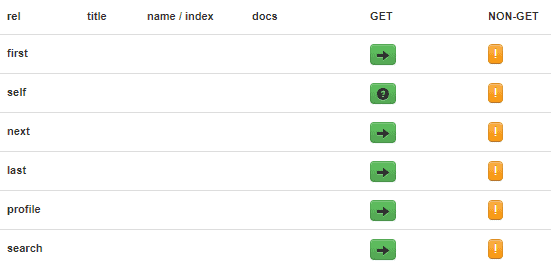
這些鏈接由 HAL 生成,位於相鄰部分:
"_links": {
    "first": {
      "href": "http://localhost:8080/books?page=0&size=20"
    },
    "self": {
      "href": "http://localhost:8080/books{?page,size,sort}",
      "templated": true
    },
    "next": {
      "href": "http://localhost:8080/books?page=1&size=20"
    },
    "last": {
      "href": "http://localhost:8080/books?page=4&size=20"
    },
    "profile": {
      "href": "http://localhost:8080/profile/books"
    },
    "search": {
      "href": "http://localhost:8080/books/search"
    }
},如果移動到搜索端點,我們還可以查看使用PagingAndSortingRepository創建的自定義端點:
{
  "_links": {
    "title-contains": {
      "href": "http://localhost:8080/books/search/title-contains{?query,page,size,sort}",
      "templated": true
    },
    "self": {
      "href": "http://localhost:8080/books/search"
    }
  }
}
HAL 上顯示了我們的title-contains端點,顯示了適當的搜索條件。請注意,由於我們已定義它不應導出,因此author-contains端點丟失。
6.3. 查看嵌入資源
嵌入資源顯示了我們/books端點上的單個圖書記錄的詳細信息。每個資源也包含自己的屬性和鏈接部分:
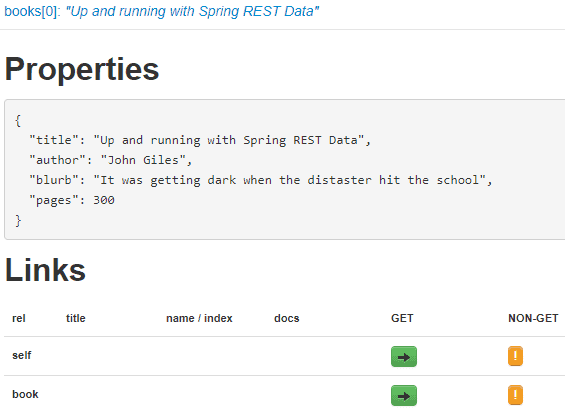
6.4. 使用表單
GET 列中的問號按鈕表示可以使用表單模態框輸入自定義搜索條件。
這是我們title-contains端點的表單:
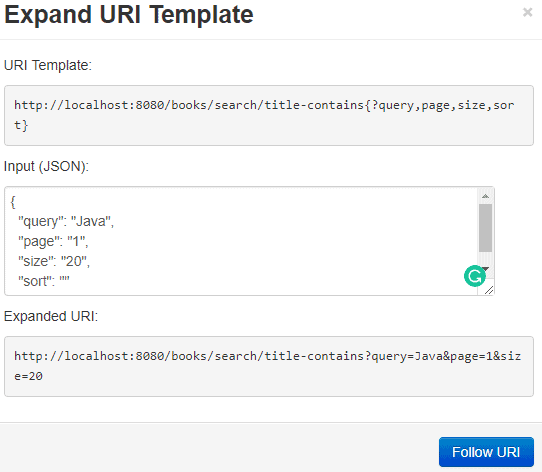
我們的自定義 URI 返回第一頁包含單詞“Java”的 20 本書。
6.5. HAL 檢查器
檢查器位於瀏覽器的右側,包含響應頭和響應體。此HAL 數據用於渲染鏈接和嵌入資源,我們在教程前面已經看到。
7. 結論
在本文中,我們總結了 HAL 是什麼,為什麼它有用,以及它如何幫助我們創建卓越的自文檔化 REST API。
我們使用 Spring 構建了一個簡單的 REST API,該 API 實現了PagingAndSortingRepository,並且定義了我們自己的端點。我們還看到了如何排除某些端點從 HAL 瀏覽器。
在定義 API 之後,我們使用測試數據對其進行了填充,並藉助 HAL 瀏覽器對其進行了詳細探索。我們看到了 HAL 瀏覽器的結構,以及允許我們逐步探索 API 並探索其數據的 UI 控制。

