1. 概述
在本教程中,我們將簡要了解 Swagger 的 @Parameter 和 @Schema 註解。 此外,我們還將比較這些註解並確定每種註解的正確用法。
2. 關鍵差異
簡單來説,@Parameter和@Schema註解為 Swagger 添加了不同的元數據。@Parameter註解用於 API 資源請求的參數,而@Schema則用於模型的屬性。
3.
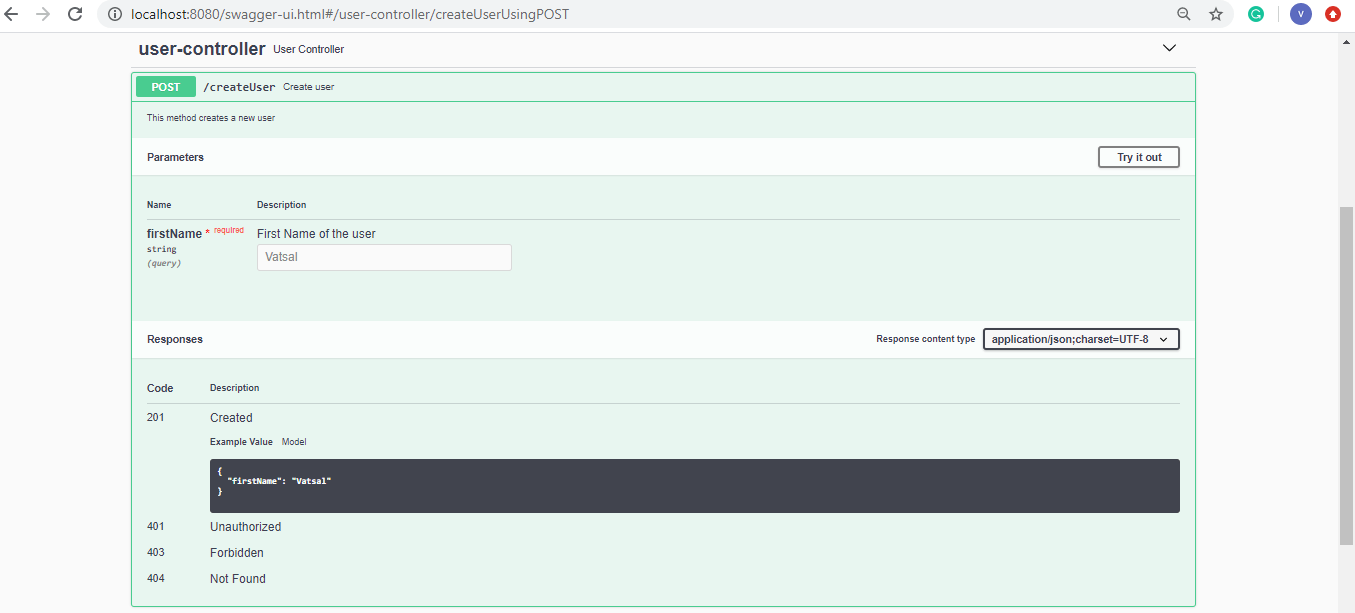
The annotation is used for defining parameters in the parameters section of an operation or path. The annotation helps to specify the name, description, and example value of the parameter. Moreover, we can specify whether the parameter is required or optional.
Let’s look at its usage:
@RequestMapping(
    method = RequestMethod.POST,
    value = "/createUser",
    produces = "application/json; charset=UTF-8")
@ResponseStatus(HttpStatus.CREATED)
@ResponseBody
@Operation(summary  = "Create user",
    description = "This method creates a new user")
public User createUser(@Parameter(
                name =  "firstName",
                description  = "First Name of the user",
                example = "Vatsal",
                required = true)
    @RequestParam String firstName) {
    User user = new User(firstName);
    return user;
}
Let’s look at the Swagger UI representation for our example:
Now, let’s look at .
4.
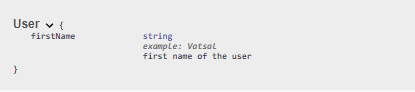
The annotation allows us to control Swagger-specific definitions such as description, name, type, example values, and allowed values for the model properties.
Also, it offers additional filtering properties in case we want to hide the property in certain scenarios.
Let’s add a few model properties to the User’s firstName field:
@Schema(
    description = "first name of the user",
    name = "firstName",
    type = "string",
    example = "Vatsal")
String firstName;
Now, let’s take a look at the User Model’s specifications in Swagger UI:
5. 結論
在本文中,我們探討了兩種 Swagger 註解,用於為參數和模型屬性添加元數據。然後,我們查看了使用這些註解的示例代碼,並觀察了它們在 Swagger UI 中的表示形式。

