
1. 概述
本教程將演示如何使用 Spring 的 <em >RestTemplate</em> 消費使用 HTTPS 加密的 REST 服務。
2. 設置
我們知道,為了安全地保護 REST 服務,我們需要從證書中生成證書和密鑰存儲 (keystore)。我們可以從認證機構 (CA) 獲取證書,以確保應用程序的安全性和對生產級應用程序的信任。
為了本文的目的,我們將使用自簽名證書在示例應用程序中使用。
我們將使用 Spring 的 RestTemplate 來消費 HTTPS REST 服務。
首先,讓我們創建一個控制器類 WelcomeController,並創建一個 /welcome 端點,該端點返回一個簡單的 String 響應:
@RestController
public class WelcomeController {

    @GetMapping(value = "/welcome")
    public String welcome() {
       return "Welcome To Secured REST Service";
    }
}
然後,讓我們在 src/main/resources 文件夾中添加我們的 keystore:
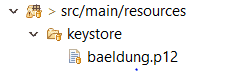
接下來,讓我們將與 keystore 相關的屬性添加到我們的 application.properties 文件中:
server.port=8443
server.servlet.context-path=/
# The format used for the keystore
server.ssl.key-store-type=PKCS12
# The path to the keystore containing the certificate
server.ssl.key-store=classpath:keystore/baeldung.p12
# The password used to generate the certificate
server.ssl.key-store-password=password
# The alias mapped to the certificate
server.ssl.key-alias=baeldung
我們現在可以訪問該端點上的 REST 服務:https://localhost:8443/welcome
3. 消費安全 REST 服務
Spring 提供了一個便捷的 <em >RestTemplate</em> 類來消費 REST 服務。
雖然消費簡單的 REST 服務相對簡單,但消費安全 REST 服務時,我們需要通過添加服務使用的證書/密鑰庫來定製 <em >RestTemplate</em>。
接下來,讓我們創建一個簡單的 <em >RestTemplate</em> 對象,並添加所需的證書/密鑰庫進行定製。
3.1. 創建一個 RestTemplate 客户端
讓我們編寫一個簡單的控制器,使用 RestTemplate 消費我們的 REST 服務:
@RestController
public class RestTemplateClientController {
    private static final String WELCOME_URL = "https://localhost:8443/welcome";

    @Autowired
    private RestTemplate restTemplate;

    @GetMapping("/welcomeclient")
    public String greetMessage() {
        String response = restTemplate.getForObject(WELCOME_URL, String.class);
        return response;
    }
}
如果運行我們的代碼並訪問 welcomeclient 端點,由於缺少用於訪問受保護的 REST 服務且有效的證書,將會收到錯誤:
javax.net.ssl.SSLHandshakeException: sun.security.validator.ValidatorException: PKIX path building failed:
sun.security.provider.certpath.SunCertPathBuilderException: unable to find valid certification path to requested
target at sun.security.ssl.Alerts.getSSLException(Alerts.java:192)
接下來,我們將學習如何解決此錯誤。
3.2. 配置RestTemplate以進行HTTPS訪問
客户端應用程序訪問受保護的REST服務時,應包含其resources 文件夾中的安全密鑰庫。此外,RestTemplate 本身還需要進行配置。
首先,我們將先前創建的baeldung.p12 密鑰庫作為 truststore 添加到 /src/main/resources 文件夾中:

接下來,我們需要在 application.properties 文件中添加 truststore 詳細信息:
server.port=8082
#trust store location
trust.store=classpath:keystore/baeldung.p12
#trust store password
trust.store.password=password
最後,讓我們通過添加信任存儲來定製 RestTemplate:
@Configuration
public class CustomRestTemplateConfiguration {

    @Value("${trust.store}")
    private Resource trustStore;

    @Value("${trust.store.password}")
    private String trustStorePassword;

    @Bean
    public RestTemplate restTemplate() throws KeyManagementException, NoSuchAlgorithmException, KeyStoreException, CertificateException, MalformedURLException, IOException {

        SSLContext sslContext = new SSLContextBuilder()
         .loadTrustMaterial(trustStore.getURL(), trustStorePassword.toCharArray()).build();
        SSLConnectionSocketFactory sslConFactory = new SSLConnectionSocketFactory(sslContext);
        HttpClientConnectionManager cm = PoolingHttpClientConnectionManagerBuilder.create()
                .setSSLSocketFactory(sslConFactory)
                .build();
        CloseableHttpClient httpClient = HttpClients.custom().setConnectionManager(cm).build();
        ClientHttpRequestFactory requestFactory = new HttpComponentsClientHttpRequestFactory(httpClient);
        return new RestTemplate(requestFactory);
    }
}
讓我們詳細瞭解 restTemplate() 方法中的關鍵步驟。
首先,我們創建一個 SSLContext 對象,它代表一個安全的套接字協議實現。我們使用 SSLContextBuilder 類中的 build() 方法來創建它。
我們使用 SSLContextBuilder 的 loadTrustMaterial() 方法將 keystore 文件和憑據加載到 SSLContext 對象中。
然後,我們創建一個 SSLConnectionSocketFactory,這是一個用於 TLS 和 SSL 連接的層級套接字工廠,通過加載 SSLContext 實現。 這一步的目的是驗證服務器是否使用了我們在前一步中加載的受信任證書列表,即驗證服務器。
現在,我們可以使用我們自定義的 RestTemplate 消費受保護的 RESTful 服務,在以下端點: http://localhost:8082/welcomeclient:

4. 結論
在本文中,我們探討了如何使用自定義的 RestTemplate 消費受保護的 REST 服務。

