
1. 概述
Swagger 是一套規範,用於文檔化和描述 REST API。它還提供端點參數值的示例值。
在本教程中,我們將演示如何生成默認示例值,用於 String 數組,因為此行為默認未啓用。
2. 指定字符串數組作為請求體參數(Swagger)
當我們在 Swagger 中指定字符串數組作為請求體參數時,會遇到問題。
Swagger 的默認示例值比較模糊,如您在 Swagger 編輯器 中所見:
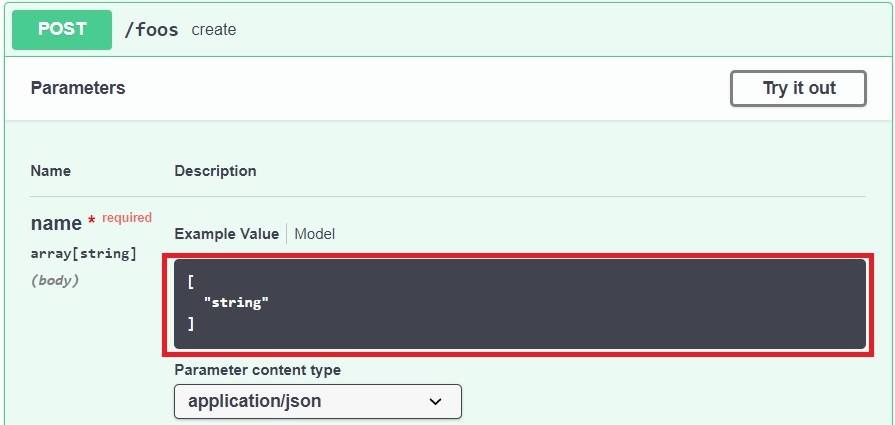
因此,我們看到 Swagger 並未展示數組內容應該是什麼樣的示例。 讓我們看看如何添加一個。
3. YAML
首先,我們使用 Swagger 指定字符串數組,採用 YAML 語法。在 schema 部分,我們包含 <em type: array 和 <em items: String。
為了更好地記錄 API 並指導用户,我們可以使用 <em example 標籤來展示如何插入值:
parameters:
  - in: body
    description: ""
    required: true
    name: name
    schema:
      type: array
      items:
        type: string
      example: ["str1", "str2", "str3"]
讓我們看看我們的顯示現在更具信息量:
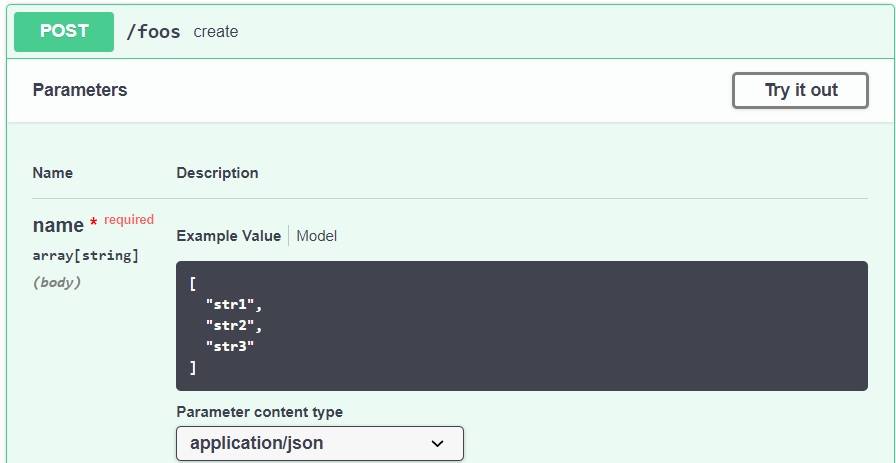
4. Springdoc
或者,我們可以使用 Springdoc 達到相同的效果。
我們需要在數據模型中使用 <em type: array</em> 和 <em example</em> 以及帶有 <em @Schema</em> 註解:
@Schema
public class Foo {
    private long id;
    @Schema(name = "name", type = "array", example = "[\"str1\", \"str2\", \"str3\"]")
    private List<String> name;
之後,還需要對 Controller 進行標註,以便 Swagger 指向數據模型。
因此,我們應該使用 @Parameters 來實現這個功能:
@RequestMapping(method = RequestMethod.POST, value = "/foos")
@ResponseStatus(HttpStatus.CREATED)
@ResponseBody
@Parameters({ @Parameter(name = "foo", description = "List of strings") })
public Foo create(@RequestBody final Foo foo) {
這就是全部!
5. 結論
在 REST API 文檔中,我們可能會遇到字符串數組作為參數。理想情況下,我們應該使用示例值進行文檔記錄。
我們可以使用 Swagger 中的example屬性來實現。或者,我們也可以在 Springdoc 中使用example註解屬性。

