
1. 概述
本文將介紹如何使用 Thymeleaf 庫在服務器端訪問 HTTP 會話。為了實現這一目標,我們將構建一個包含表單(用於發送名稱分析請求)和結果展示區域的網頁,以及一個顯示會話期間所有啓動請求的控制面板。
為了簡化示例,我們將使用 Spring + Thymeleaf,因此我們將使用 Thymeleaf Spring Standard 方言。
2. Thymeleaf 中的 Web 會話屬性
會話信息位於 Servlet 上下文中,並且我們可以在模板級別或 Spring Boot 控制器內部訪問該信息。現在,我們將從兩個角度訪問會話信息。
2.1. 在 Thymeleaf 模板中訪問會話屬性
在 Thymeleaf 中,我們有兩個始終可用的 基本對象:, ctx 和 locale,它們都以“#”為前綴。<strong>``#ctx``基本對象提供對包含 HTTP 會話信息的 Servlet 上下文的訪問。因此,在模板中,我們可以使用以下表達式訪問會話:
#ctx.session如果需要以更簡潔的方式訪問會話,我們可以使用變量session,則前一個命令等價於:
session現在,讓我們檢查一下在模板中使用會話實例時,我們能做什麼以及不能做什麼。首先,我們可以獲取會話內部有多少屬性:
${#ctx.session.size()}此外,我們可以檢查會話是否為空:
${#ctx.session.isEmpty()}我們無法通過在模板中使用方法 containsKey **來檢查屬性是否已在會話中註冊。
${#ctx.session.containsKey('lastAnalysis')}這種方法始終會返回 true,因此,我們應該檢查會話屬性是否為 null:
${#ctx.session.lastAnalysis}==null最後,我們可以訪問會話屬性:
${#ctx.session.foo}2.2. 在 Spring Boot 控制器中訪問會話屬性
在控制器中,Thymeleaf 提供的 <em >IWebSession</em> 接口定義了我們訪問會話信息的各種方法:
public interface IWebSession {
    public boolean exists();
    public boolean containsAttribute(String name);
    public int getAttributeCount();
    public Set<String> getAllAttributeNames();
    public Map<String,Object> getAttributeMap();
    public Object getAttributeValue(String name);
    public void setAttributeValue(String name,Object value);
    public void removeAttribute(String name);
}
在我們的示例中,我們將看到如何獲取 IWebSession 接口的實例,並使用它來移除、獲取和設置其屬性,我們不會使用接口的所有方法,但足以展示其使用方式。
從結尾開始,IServletWebExchange 將提供 IWebSession 實例。我們使用 HttpServletRequest 和 HttpServletResponse 在 NameAnalysisController 控制器請求中通過 webApp 屬性構建 IServletWebExchange 實例。
讓我們看一下方法 getIWebSession:
private IWebSession getIWebSession(HttpServletRequest request, HttpServletResponse response) {
    IServletWebExchange exchange = webApp.buildExchange(request, response);
    return exchange == null ? null : exchange.getSession();
}
現在,讓我們來查看<em title="webApp">webApp</em>屬性的類型以及它的實例化方式:
private JakartaServletWebApplication webApp;

@Autowired
public NameAnalysisController(NameAnalysisService nameAnalysisService, SessionNameRequestFactory sessionNameRequestFactory, ServletContext servletContext) {
    super();
    ...
    this.webApp = JakartaServletWebApplication.buildApplication(servletContext);
}
在這裏,我們可以看到,<em >webApp</em> 屬性是一個 <em >JakartaServletWebApplication</em> 實例,它使用了注入的 <em >ServletContext</em> 實例。 到目前為止,我們已經準備好訪問會話信息。
3. 項目設置
讓我們回顧一下我們的項目設置。這是一個 Maven 項目,包含兩個依賴項。第一個依賴項,spring-boot-starter-web,將導入所有用於使用 Spring Boot 構建 Web 項目所需的內容:
<dependency>
    <groupId>org.springframework.boot</groupId>
    <artifactId>spring-boot-starter-web</artifactId>
</dependency>其次,<a href="https://mvnrepository.com/artifact/org.springframework.boot/spring-boot-starter-thymeleaf/3.1.1" rel="noopener"><em >spring-boot-starter-thymeleaf</em></a > 將導入所有內容,從而啓用 Thymeleaf 與 Spring Boot 之間的協同使用:
<dependency>
    <groupId>org.springframework.boot</groupId>
    <artifactId>spring-boot-starter-thymeleaf</artifactId>
    <version>${spring.boot.starter.thymeleaf}</version>
</dependency>
3.1. Thymeleaf 引擎配置
spring-boot-starter-thymeleaf 依賴項將自動配置所有內容,但在本示例中,我們將對 SpringResourceTemplateResolver 進行一些調整,以設置模板模式、模板前綴和模板後綴:
@Autowired
public SpringWebConfig(SpringResourceTemplateResolver templateResolver) {
    super();

    templateResolver.setPrefix("/WEB-INF/templates/");
    templateResolver.setSuffix(".html");
    templateResolver.setTemplateMode(TemplateMode.HTML);
}
<p>With these changes, the resolver will transform the requests by adding the prefix <em>/WEB-INF/templates/</em> and the suffix <em>.html.</em> So, the following request to the <em>URL</em>:</p>
http://localhost:8080/name-analysis.html已轉換為以下模板路徑:
WEB-INF/templates/name-analysis.html4. 運行示例
為了檢查所有內容是否正常運行,請從項目的根目錄下使用以下 Maven 命令在命令行中執行:
mvn spring-boot:run該命令將啓動 Tomcat 服務器並嵌入應用程序。服務器監聽 8080 端口,並將示例應用程序發佈到根上下文。因此,訪問基本頁面的 URL 是:
http://localhost:8080此請求將顯示:
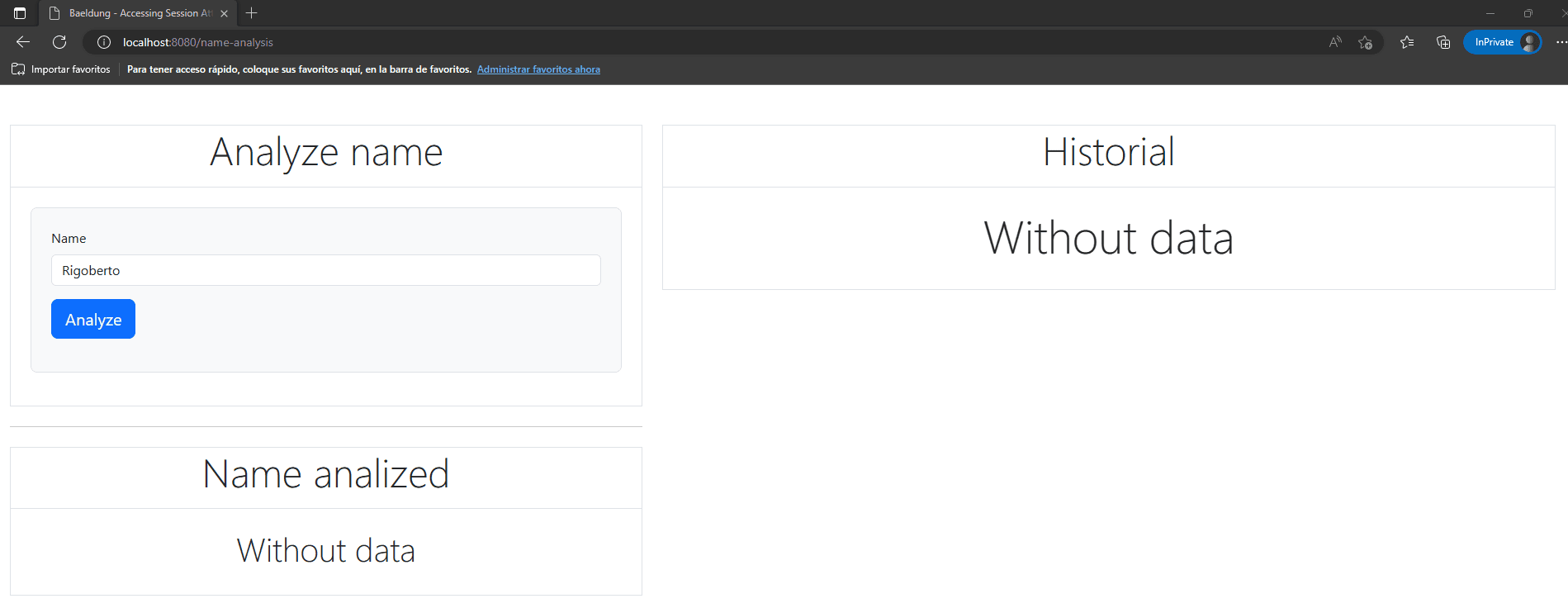
在這裏,我們可以看到該示例的三個不同部分。我們首先從 分析名稱面板開始。它無法訪問任何會話信息。它使用暴露的 nameRequest模型屬性。
接下來是 已分析名稱面板,它顯示了使用會話中的 lastRequest屬性對名稱分析請求的結果。最後是最後一個面板,請求歷史面板,它也會訪問會話中 requests屬性存儲的信息。
5. 結論
在本文中,我們學習瞭如何配置 Maven 項目以使用 Spring + Thymeleaf。 此外,我們重點介紹瞭如何從 Thymeleaf 模板和 Spring Boot 服務器端訪問 HTTP 會話信息。 要深入瞭解 Thymeleaf 的工作原理,請閲讀《Spring 中 Thymeleaf 的介紹》。

