1. 概述
在本教程中,我們將描述一般的枚舉攻擊。更具體地説,我們將探索針對Web應用程序的用户名枚舉攻擊。最重要的是,我們將探討通過Spring Security處理這些攻擊的選項。
2. 解釋枚舉攻擊
枚舉(Enumeration)技術上指的是對一個集合中所有項目進行完整且有序的列舉。 儘管這個定義主要適用於數學,但其本質使其成為一種強大的黑客工具。枚舉經常會暴露可用於利用的攻擊向量。 在這個語境下,它通常被稱為資源枚舉。
資源枚舉,正如其名稱所暗示的,是一種從任何主機收集資源的途徑。 這些資源可以是任何有價值的東西,包括用户名、服務或頁面。 這些資源可能會暴露主機中的潛在漏洞。
現在,存在多種可能的途徑,既有被探索的,也有未被探索的,來利用這些漏洞。
3. 針對 Web 應用的流行枚舉攻擊
在 Web 應用中,最常用的枚舉攻擊之一是用户名枚舉攻擊。它基本上利用 Web 應用的任何顯式或隱式功能來收集有效的用户名。攻擊者可能會使用流行的用户名選項來攻擊 Web 應用。
Web 應用中,哪些功能可能表明用户名是否有效? 誠然,它可能多種多樣。 例如,它可以是設計好的功能,如允許用户知道用户名已存在之類的註冊頁面。
或者,它可能像事實一樣隱式,即使用有效用户名進行登錄嘗試所需的時間與使用無效用户名進行嘗試所需的時間大相徑庭。
4. Setup to Emulate Username Enumeration Attack
我們將使用一個簡單的用户 Web 應用程序,使用 Spring Boot 和 Spring Security,來演示這些攻擊向量。該 Web 應用程序將具有一個最小的功能集,以支持演示。關於如何設置此類應用程序的詳細討論在之前的教程中進行了説明。
Web 應用程序的常見功能可能會泄露信息,這些信息可用於發起枚舉攻擊。讓我們來了解一下這些功能。
4.1. User Registration
用户註冊需要一個唯一的用户名,電子郵件地址通常被選擇以簡化。現在,如果我們選擇一個已存在電子郵件,應用程序應該告訴我們這一點:
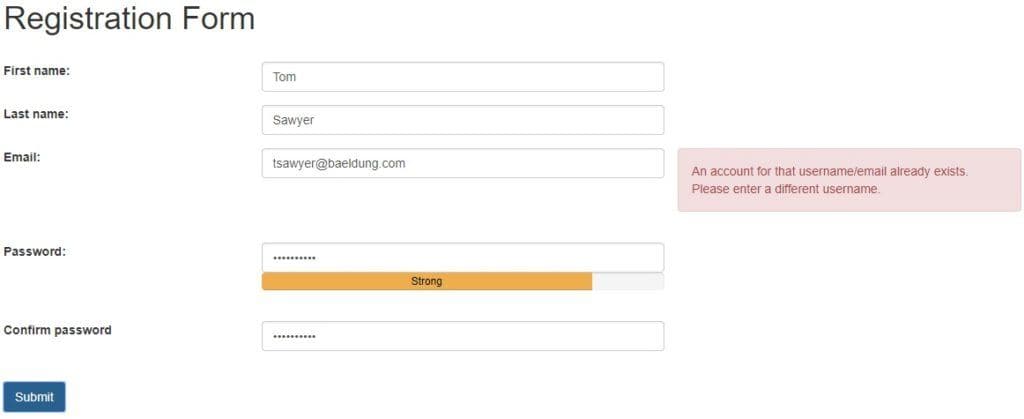
考慮到電子郵件列表並非難以獲取,這可能導致用户名枚舉攻擊,以從應用程序中“魚出”有效的用户名。
4.2. User Login
同樣,當我們嘗試登錄到應用程序時,我們需要提供用户名和密碼。現在,如果提供的用户名不存在,應用程序可能會返回此信息:

正如之前一樣,這足以被用來進行用户名枚舉攻擊。
4.3. Reset Password
重置密碼通常被實施為向用户的電子郵件發送密碼重置鏈接。現在,再次,我們需要提供用户名或電子郵件:

如果此用户名或電子郵件不存在於應用程序中,應用程序將告知我們這一點,從而導致我們之前所見到的類似漏洞。
5. Preventing Username Enumeration Attacks
There can be several ways to prevent a username enumeration attack. Many of them we can achieve through simple tweaks in the features like user messages on a web application.
Moreover, Spring Security over time has matured enough to support handling many of these attack vectors. There are features out-of-the-box and extension points to create custom safeguards. We’ll explore some of these techniques.
Let’s go through popular options available to prevent such attacks. Please note that not all of these solutions are suitable or even possible in every part of the web application. We’ll discuss this in more detail as we go along.
5.1. Tweaking Messages
First, we must rule out all possibilities of inadvertently giving out more information than what is required. This would be difficult in registration but fairly simple in login and reset password pages.
For instance, we can easily make the message for login page abstract:
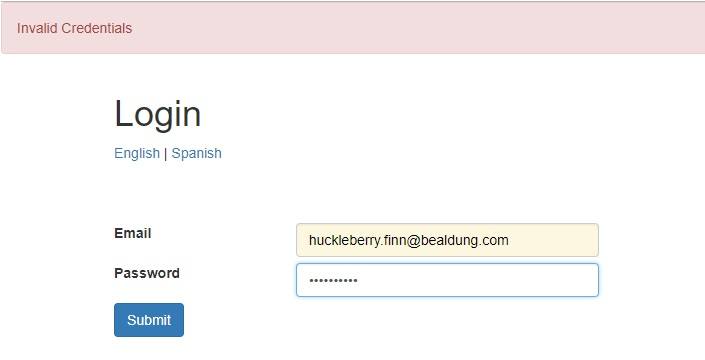
We can do similar tweaks to the message for the password reset page.
5.2. Including CAPTCHA
While tweaking the messages works well on some pages, there are pages like registration where it’s tricky to do so. In such cases, we can use another tool called CAPTCHA.
Now, at this point, it’s worthwhile to note that any enumeration attack most likely is robotic due to a vast number of possibilities to go through. Hence, detecting a human or robotic presence can help us prevent an attack. CAPTCHA serves as a popular way to achieve this.
There are several possible ways to implement or integrate CAPTCHA services in a web application. One of these services is reCAPTCHA by Google, which can be easily integrated on the registration page.
5.3. Rate Limiting
While CAPTCHA serves the purpose well, it does add latency and, more importantly, inconveniences to legitimate users. This is more relevant for frequently used pages like login.
One technique that can help prevent robotic attacks on frequently used pages like login is rate limiting. Rate limiting refers to preventing successive attempts for a resource after a certain threshold.
For example, we can block requests from a particular IP for a day after three failed attempts at login:

Spring Security makes this particularly convenient.
We begin by defining the listener for AuthenticationFailureBadCredentialsEvent which will count the number of failed attempts by source IP. When an attacker tries to run a brute force attack it will block after the threshold that was set in the LoginAttemptService and it will not be able to reset the counter for 24h. Once a set threshold is breached, subsequent requests are blocked in the UserDetailsService. We also check at every failure if the user is blocked and generate the correct error message.
A detailed discussion on this approach is available in another tutorial.
5.4. Geo Limiting
Additionally, we can capture the location by country of a user during registration. We can use this to verify a login attempt originating from a different location. If we detect an unusual location, suitable action can be taken:
- Enable Captcha selectively
- Enforce step-up authentication (as part of multi-factor authentication)
- Ask the user to verify the location securely
- Block the user temporarily on successive requests
Again, Spring Security, through its extension points, makes it possible to plug in a custom location verification service in the AuthenticationProvider. A particular flavor of this has been described in detail in a previous tutorial.
5.5. Multi-Factor Authentication
Lastly, we should note that password-based authentication is often the first and, in most cases, the only step required. But it’s not uncommon for applications to adopt multi-factor authentication mechanisms for better security. This is especially true for sensitive applications like online banking.
There are many possible factors when it comes to multi-factor authentication:
- Knowledge Factor: This refers to what a user knows, like PIN
- Possession Factor: This refers to what a user possesses, like a token or smartphone
- Inherence Factor: This refers to what a user inherently has, like fingerprints
Spring Security is quite a convenience here as well, as it allows us to plug in a custom AuthenticationProvider. The Google Authenticator app is a popular choice to implement additional possession factor. This allows users to generate an ephemeral token on the app in their smartphone and use it for authentication in any application. Obviously, this requires setting up the user beforehand in the application, either during registration or later on.
Integrating Google Authenticator in a Spring security application has been well covered in a previous tutorial.
More importantly, a solution like multi-factor authentication is only suitable if the application needs it. Hence, we should not use it primarily to prevent enumeration attacks.
5.6. Processing Time Delays
While processing a request like a login, checking if the username exists is often the very first thing we do. If a username does not exist, the request immediately returns with an error. On the contrary, a request with a valid username would involve many further steps, like password match and role verification. Naturally, the time to respond to both these cases may vary.
Now, even though we abstract the error message to hide the fact of whether a username is valid or not, a significant difference in processing time may tip off an attacker.
A possible solution for this issue can be to add a forced delay to rule out the difference in processing times. However, as this is not a problem that can occur with certainty, we should only employ this solution if necessary.
6. 總結
雖然我們涵蓋了在用户名枚舉攻擊中使用各種技巧,但自然會有人問,應該在什麼情況下使用它們?顯然,對此沒有一個明確的答案,因為它很大程度上取決於應用程序的類型和要求。
例如,與用户發送的消息必須儘可能減少信息泄露。此外,限制對諸如登錄等資源的連續失敗嘗試也是明智之舉。
然而,我們應該只使用任何額外的措施,如果要求確實需要它們,並且應該在對可用性造成的阻礙進行理性權衡。
此外,重要的是要意識到我們可以針對不同的資源應用這些措施的任何組合,以選擇性地保護它們。
7. 結論
在本教程中,我們討論了枚舉攻擊——特別是用户名枚舉攻擊。我們通過對一個簡單的 Spring Boot 應用程序(帶有 Spring Security)的視角來觀察這些攻擊。
我們探討了解決用户名枚舉攻擊的多種方法。
最後,我們討論了這些措施在應用程序安全中的適用性。

