
1. 概述
Spring AI 是一種應用程序框架,它提供了一個通用的接口,用於集成各種 LLM(大型語言模型),從而幫助我們將其集成到我們的 Spring Boot 應用程序中。
在本教程中,我們將探索如何將 Spring AI 與 Google Cloud Vertex AI 平台集成,並採用各種模型,以在我們的應用程序中提供聊天和嵌入式能力。
2. 先決條件
我們需要在我們的 <em>pom.xml</em> 中包含 Spring AI Vertex AI 的 Gemini 和 embedding 依賴項。
<dependency>
    <groupId>org.springframework.ai</groupId>
    <artifactId>spring-ai-starter-model-vertex-ai-gemini</artifactId>
</dependency>
<dependency>
    <groupId>org.springframework.ai</groupId>
    <artifactId>spring-ai-starter-model-vertex-ai-embedding</artifactId>
</dependency>
這些啓動模型依賴項將自動配置 Vertex AI 模型,遵循我們在 application.yml 中的設置。
作為第一步,我們需要在 Google Cloud 控制枱中啓用 Vertex AI API,以便向 Vertex AI 發送 API 調用。
啓用後,我們需要在控制枱中運行兩個額外的命令,使用 Google Cloud CLI。
第一個命令設置所有後續 CLI 命令的活動項目:
$ gcloud config set project <PROJECT-ID>PROJECT-ID 參數是 Vertex AI 啓用的 Google Cloud 項目的唯一 ID。
第二個參數用於進行身份驗證,並獲取 OAuth2 訪問令牌,該令牌授予我們對 Vertex AI API 的訪問權限:
$ gcloud auth application-default login <YOUR-ACCOUNT>這將打開一個 Web 瀏覽器窗口,並提示我們使用 Google Cloud 賬户進行身份驗證。在身份驗證後,它會將 OAuth2 訪問令牌本地保存。
3. 聊天
Gemini 是 Vertex AI 中提供的聊天模型。 在本部分,我們將將 Gemini 集成到我們的 Spring Boot 應用程序中。
3.1. 配置
我們需要向我們的 application.yml 添加一些屬性,以便將聊天模型與 Spring AI 集成:
spring:
  ai:
    vertex:
      ai:
        gemini:
          project-id: <YOUR-GOOGLE-CLOUD-PROJECT-ID>
          location: "europe-west1"
          model: "gemini-2.0-flash-lite"
項目 ID 屬性指定了我們的應用程序中應使用的 Google Cloud 項目資源,包括身份驗證和計費。
模型 屬性指定我們將集成哪個 Gemini Chat 模型。有多種 Gemini 模型 可供選擇。
3.2. 服務
讓我們創建一個簡單的 ChatService,以提示作為輸入參數:
@Component
@SessionScope
public class ChatService {
    private final ChatClient chatClient;

    public ChatService(ChatModel chatModel, ChatMemory chatMemory) {
        this.chatClient = ChatClient.builder(chatModel)
          .defaultAdvisors(MessageChatMemoryAdvisor.builder(chatMemory).build())
          .build();
    }

    public String chat(String prompt) {
        return chatClient.prompt()
          .user(userMessage -> userMessage.text(prompt))
          .call()
          .content();
    }
}
本服務中,我們注入了自動配置的 Gemini ChatModel,以創建我們的 ChatClient 實例。
由於 LLM 是無狀態的,它們不具備先前對話的知識。因此,我們還注入一個 ChatMemory 實例,以便我們提供類似對話的體驗。
我們需要一個 ChatController 來接受我們測試目的的查詢:
@RestController
public class ChatController {
    private final ChatService chatService;

    public ChatController(ChatService chatService) {
        this.chatService = chatService;
    }

    @PostMapping("/chat")
    public ResponseEntity<String> chat(@RequestBody @NotNull String prompt) {
        String response = chatService.chat(prompt);
        return ResponseEntity.ok(response);
    }
}
此控制器接受請求體中的字符串,並通過 ChatService 將提示發送到 Gemini 聊天模型。
3.3. 測試運行
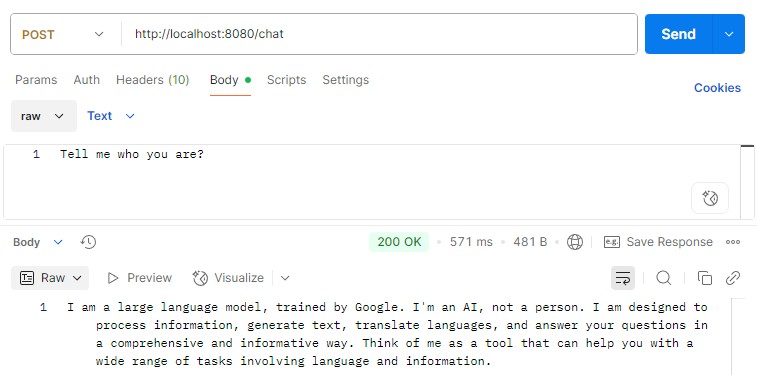
現在,讓我們通過 Postman 向該端點發出提示,進行測試。 我們應該能收到 Gemini 的響應:
4. 文本嵌入
文本嵌入是指將自然語言文本輸入轉換為高維向量表示的過程。 嵌入的應用場景包括基於語境語義的相似性搜索。
4.1. 配置
我們需要一種不同的模型來將文本轉換為嵌入。 讓我們在 application.yml 中添加一些額外的屬性:
spring:
  ai:
    vertex:
      ai:
        embedding:
          project-id: <YOUR-GOOGLE-CLOUD-PROJECT-ID>
          location: "europe-west1"
          text:
            options:
              model: "gemini-embedding-001"
類似於聊天模型,我們需要定義 project-id 和 location 屬性,對於這些屬性,我們可以應用先前聊天配置部分中定義的數值。
4.2. 服務
現在,我們的應用程序已配置為將 EmbeddingModel 注入到我們的服務中。 我們可以定義一個 TextEmbeddingService 類,用於將文本轉換為嵌入:
@Service
public class TextEmbeddingService {
    private final EmbeddingModel embeddingModel;

    public TextEmbeddingService(EmbeddingModel embeddingModel) {
        this.embeddingModel = embeddingModel;
    }

    public EmbeddingResponse getEmbedding(String... texts) {
        EmbeddingRequest request = new EmbeddingRequest(Arrays.asList(texts), null);
        return embeddingModel.call(request);
    }
}
讓我們創建一個 TextEmbeddingController,以便進行測試運行:
@RestController
public class TextEmbeddingController {
    private final TextEmbeddingService textEmbeddingService;

    public TextEmbeddingController(TextEmbeddingService textEmbeddingService) {
        this.textEmbeddingService = textEmbeddingService;
    }

    @PostMapping("/embedding/text")
    public ResponseEntity<EmbeddingResponse> getEmbedding(@RequestBody @NotNull String text) {
        EmbeddingResponse response = textEmbeddingService.getEmbedding(text);
        return ResponseEntity.ok(response);
    }
}
4.3. 測試運行
現在,我們準備測試我們的文本嵌入服務。讓我們將一些文本發送到該端點,並查看它返回的內容:
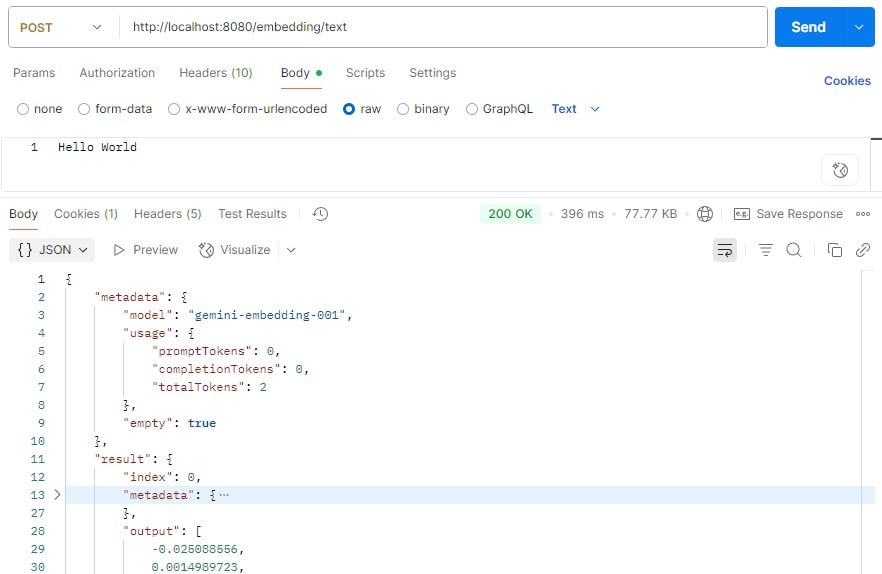
完成操作後,該端點返回了元數據,以及最重要的,我們將在 output 屬性中找到的嵌入。
5. 多模態嵌入
除了文本之外,Vertex AI 還可以將各種媒體,如圖像,轉換為嵌入。
使用多模態嵌入服務時,我們不需要進行任何額外的配置。 只需要在 application.yml 中配置文本嵌入配置即可。
5.1. 服務
讓我們創建一個 MultiModalEmbeddingService,用於將不同圖像轉換為嵌入向量:
@Service
public class MultiModalEmbeddingService {
    private final DocumentEmbeddingModel documentEmbeddingModel;

    public MultiModalEmbeddingService(DocumentEmbeddingModel documentEmbeddingModel) {
        this.documentEmbeddingModel = documentEmbeddingModel;
    }

    public EmbeddingResponse getEmbedding(MimeType mimeType, Resource resource) {
        Document document = new Document(new Media(mimeType, resource), Map.of());
        DocumentEmbeddingRequest request = new DocumentEmbeddingRequest(List.of(document));
        return documentEmbeddingModel.call(request);
    }
}
我們需要圖像 資源及其 MIME 類型,以便將其轉換為嵌入式對象。 目前,Vertex AI 接受 BMP、GIF、JPG 和 PNG 圖像格式。
讓我們創建一個控制器,該控制器接受來自請求的圖像文件。 它從請求內容類型中派生 MIME 類型,並將圖像文件 資源以及 MIME 類型發送到 多模態嵌入服務。
@RestController
public class MultiModalEmbeddingController {
    private final MultiModalEmbeddingService embeddingService;

    public MultiModalEmbeddingController(MultiModalEmbeddingService embeddingService) {
        this.embeddingService = embeddingService;
    }

    @PostMapping("/embedding/image")
    public ResponseEntity<EmbeddingResponse> getEmbedding(@RequestParam("image") @NotNull MultipartFile imageFile) {
        EmbeddingResponse response = embeddingService.getEmbedding(
          MimeType.valueOf(imageFile.getContentType()),
          imageFile.getResource());
        return ResponseEntity.ok(response);
    }
}
5.2. 測試運行
我們將使用圖像代替文本發送到控制器端點:
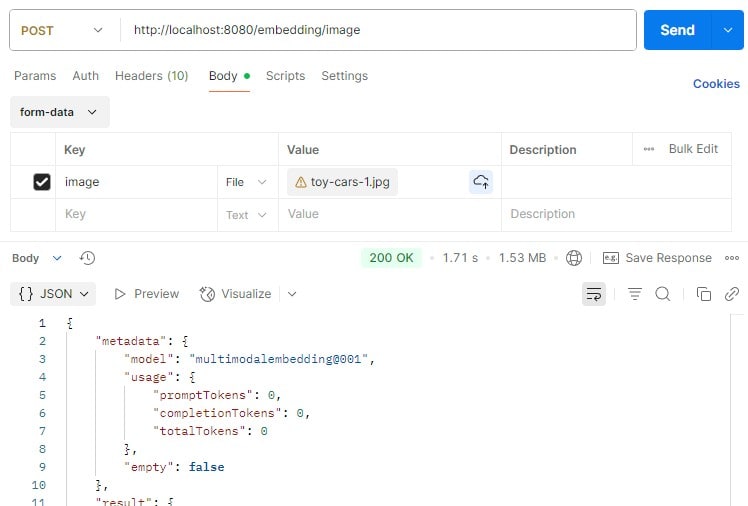
完成後,我們收到了與文本嵌入類似的迴應,並且可以在響應的 output 屬性中找到圖像嵌入。
6. 結論
Spring AI 簡化了 LLM 與我們應用程序的集成,這有助於我們以最小的開發工作量採用和切換不同的 LLM。
在本文中,我們探討了在 Spring Boot 應用程序中設置 Vertex AI 的方法。我們還學習瞭如何將 Gemini chat 模型和嵌入模型應用於文本和圖像,將其轉換為嵌入式表示,以便進行進一步的處理和分析。

