
1. 引言
本文將探討如何使用 Spring Boot 與 AWS AppSync 結合使用。 AWS AppSync 是一種完全託管的企業級 GraphQL 服務,具有實時數據同步和離線編程功能。
2. 設置 AWS AppSync
首先,我們需要擁有一個活躍的 AWS 賬户。 確認賬户已準備就緒後,我們可以在 AWS 控制枱中搜索 AppSync。 然後,我們將點擊 入門 AppSync 鏈接。
2.1. 創建 AppSync API
按照 快速啓動指南 創建我們的 API,我們將使用 Event App 示例項目。然後點擊 啓動 以命名和創建應用程序:
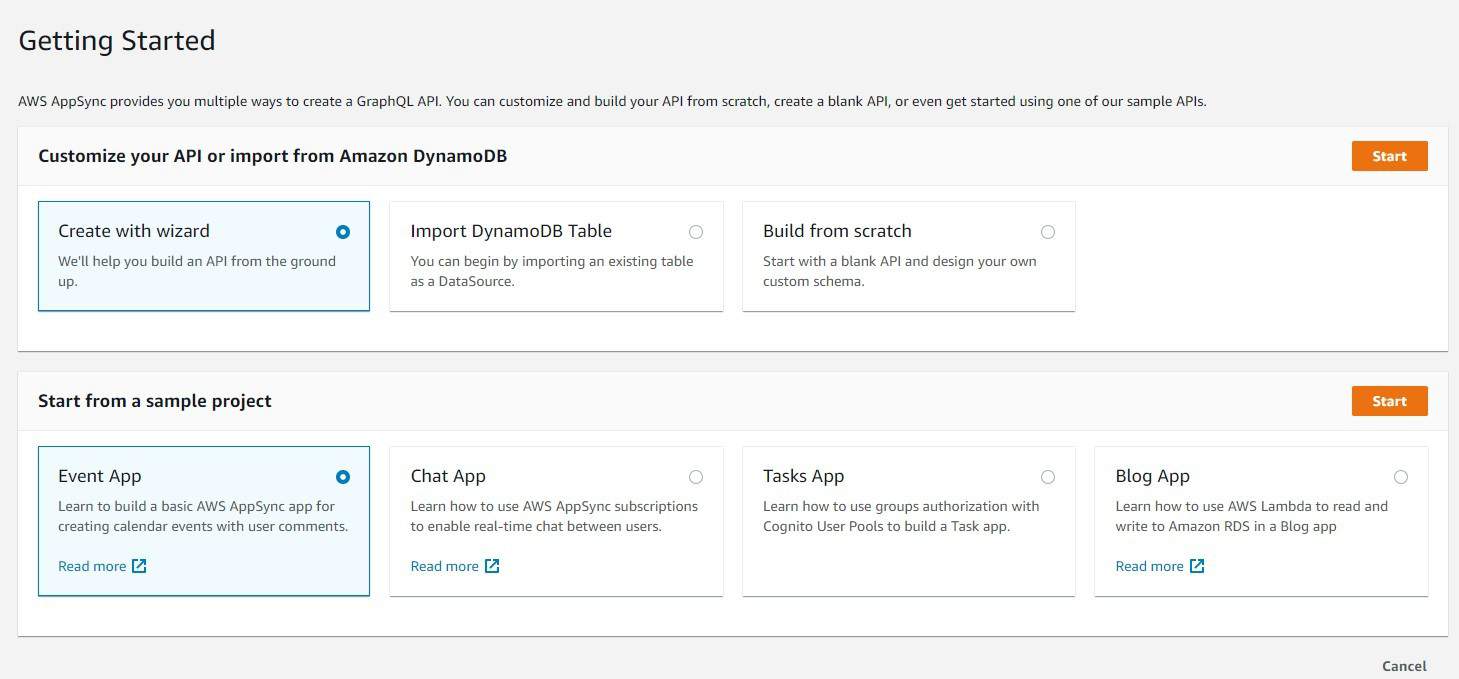
這將帶我們到 AppSync 應用程序控制台。現在讓我們來查看我們的 GraphQL 模型。
2.2 GraphQL 事件模型
GraphQL 使用模式(schema)來定義客户端可訪問的數據以及如何與 GraphQL 服務器交互。該模式包含查詢、變體(mutations)和各種聲明的類型。
為了簡化理解,我們來看一下默認 AWS AppSync GraphQL 模式中的一部分,即 事件 模型:
type Event {
  id: ID!
  name: String
  where: String
  when: String
  description: String
  # Paginate through all comments belonging to an individual post.
  comments(limit: Int, nextToken: String): CommentConnection
}
Event 是一個聲明型類型,包含一些 String 字段和一個 CommentConnection 類型。 注意 ID 字段上的感嘆號。這意味着它是一個必需/非空字段。
這應該足以理解我們的模式的基本知識。但是,要獲取更多信息,請訪問 GraphQL 網站。
3. Spring Boot
現在我們已經完成了 AWS 端的全部設置,接下來讓我們看看我們的 Spring Boot 客户端應用程序。
3.1. Maven 依賴
為了訪問我們的 API,我們將使用 Spring Boot Starter WebFlux 庫,該庫提供對 WebClient 的訪問,WebFlux 是 Spring 的新替代方案,替代了 RestTemplate。
    <dependency>
      <groupId>org.springframework.boot</groupId>
      <artifactId>spring-boot-starter-webflux</artifactId>
    </dependency>
請查看我們關於 WebClient 的文章以獲取更多信息。
3.2. GraphQL 客户端
為了向我們的 API 發送請求,我們首先將使用 RequestBodySpec,並藉助 WebClient 構建器,提供 AWS AppSync API URL 和 API 密鑰:
WebClient.RequestBodySpec requestBodySpec = WebClient
    .builder()
    .baseUrl(apiUrl)
    .defaultHeader("x-api-key", apiKey)
    .build()
    .method(HttpMethod.POST)
    .uri("/graphql");
請不要忘記添加 API 密鑰標頭,即 x-api-key。API 密鑰用於驗證我們 AppSync 應用。
4. 使用 GraphQL 類型
This section explores how to work with GraphQL types, which are the foundation of GraphQL schemas. GraphQL types define the structure and data of your queries and mutations. Understanding types is crucial for building efficient and maintainable GraphQL APIs.
Understanding GraphQL Types
GraphQL types are used to define the shape of your data. They specify the name, type, and properties of each field in your schema. Common GraphQL types include:
- String: Represents textual data.
- Int: Represents integer values.
- Float: Represents floating-point numbers.
- Boolean: Represents true or false values.
- ID: A unique identifier, often used for resolving relationships between objects.
- Null: Represents the absence of a value.
Example: A Simple Query
query GetUser {
  user(id: "123") {
    id
    name
    email
  }
}
In this example, the query keyword indicates that we are performing a query. The GetUser part is just a descriptive name for the query. The user field is a field within the User type. The id, name, and email fields are properties of the User type.
4.1. 查詢
設置我們的查詢涉及將其添加到消息主體中的一個 query 元素中:
Map<String, Object> requestBody = new HashMap<>();
requestBody.put("query", "query ListEvents {"
  + " listEvents {"
  + "   items {"
  + "     id"
  + "     name"
  + "     where"
  + "     when"
  + "     description"
  + "   }"
  + " }"
  + "}");
使用我們的 requestBody, 讓我們調用我們的 WebClient 以檢索響應體:
WebClient.ResponseSpec response = requestBodySpec
    .body(BodyInserters.fromValue(requestBody))
    .accept(MediaType.APPLICATION_JSON, MediaType.APPLICATION_XML)
    .acceptCharset(StandardCharsets.UTF_8)
    .retrieve();
最後,我們可以將身體作為 String:
String bodyString = response.bodyToMono(String.class).block();
assertNotNull(bodyString);
assertTrue(bodyString.contains("My First Event"));
4.2. 變體 (Mutations)
GraphQL 允許通過變體 (mutations) 更新和刪除數據。變體修改服務器端的數據,並遵循與查詢相似的語法。
讓我們添加一個新事件,使用 add 變體查詢:
String queryString = "mutation add {"
  + "    createEvent("
  + "        name:\"My added GraphQL event\""
  + "        where:\"Day 2\""
  + "        when:\"Saturday night\""
  + "        description:\"Studying GraphQL\""
  + "    ){"
  + "        id"
  + "        name"
  + "        description"
  + "    }"
  + "}";

requestBody.put("query", queryString);
AppSync的最大優勢之一,以及GraphQL的一般優勢,在於一個endpoint URL即可提供整個schema中的所有CRUD功能。
我們可以重用相同的WebClient來添加、更新和刪除數據。我們只需根據查詢或 mutating 操作中的回調函數獲取一個新的響應。
assertNotNull(bodyString);
assertTrue(bodyString.contains("My added GraphQL event"));
assertFalse(bodyString.contains("where"));
5. 結論
在本文中,我們探討了如何快速使用 AWS AppSync 設置 GraphQL 應用並使用 Spring Boot 客户端訪問它。
AppSync 為開發者提供了一個強大的 GraphQL API,通過單個端點即可訪問。 欲瞭解更多信息,請查看我們關於創建 GraphQL Spring Boot 服務器的教程。

