
1. 概述
本文將編寫一個 API 規範,允許返回相同的響應碼下兩個不同的對象。 我們將演示如何使用該規範生成 Java 代碼和 Swagger 文檔。
2. 問題描述
讓我們定義兩個對象。一輛 汽車 有車主和車牌作為屬性,兩者均為 字符串。 另一方面,一輛 自行車 有車主和速度。速度是一個 整數。
使用 OpenAPI,這些定義對應於以下描述:
Car:
  type: object
  properties:
    owner:
      type: string
    plate:
      type: string
Bike:
  type: object
  properties:
    owner:
      type: string
    speed:
      type: integer
我們想要描述一個端點 /vehicle,它將接受 GET 請求,並且能夠返回 Car 或 Bike。 也就是説,我們想要完成以下描述:
paths:
  /vehicle:
    get:
      responses:
        '200':
          # return Car or Bike
我們將會討論這方面的內容,涵蓋 OpenAPI 2 和 3 規範。
3. 使用 OpenAPI 3 實現兩種不同響應
OpenAPI 3 引入了 oneOf,這正是我們需要的。
3.1. 構建描述文件
在 OpenAPI 3 規範中,<em >oneOf</em> 期望一個對象數組,並指示提供的值必須與數組中的任何一個對象完全匹配。
schema:
  oneOf:
    - $ref: '#/components/schemas/Car'
    - $ref: '#/components/schemas/Bike'
此外,OpenAPI 3 引入了展示各種響應示例的可能性。為了清晰起見,我們確實希望提供至少一個包含 Car 示例和一個包含 Bike 示例的響應:
examples:
  car:
    summary: an example of car
    value:
      owner: baeldung
      plate: AEX305
  bike:
    summary: an example of bike
    value:
      owner: john doe
      speed: 25
最後,讓我們來查看整個描述文件:
openapi: 3.0.0
info:
  title: Demo api
  description: Demo api for the article 'specify two responses with same code based on optional parameter'
  version: 0.1.0
paths:
  /vehicle:
    get:
      responses:
        '200':
          description: Get a vehicle
          content:
            application/json:
              schema:
                oneOf:
                  - $ref: '#/components/schemas/Car'
                  - $ref: '#/components/schemas/Bike'
              examples:
                car:
                  summary: an example of car
                  value:
                    owner: baeldung
                    plate: AEX305
                bike:
                  summary: an example of bike
                  value:
                    owner: john doe
                    speed: 25
components:
  schemas:
    Car:
      type: object
      properties:
        owner:
          type: string
        plate:
          type: string
    Bike:
      type: object
      properties:
        owner:
          type: string
        speed:
          type: integer
3.2. 生成 Java 類
現在,我們將使用我們的 YAML 文件來生成我們的 API 接口。 使用兩個 maven 插件,swagger-codegen 和 openapi-generator,可以從 api.yaml 文件中生成 Java 代碼。 在版本 6.0.1 及更高版本中,openapi-generator 不支持 oneOf,因此我們將在這個文章中使用 swagger-codegen。
我們將使用以下配置用於 swagger-codegen 插件:
<plugin>
    <groupId>io.swagger.codegen.v3</groupId>
    <artifactId>swagger-codegen-maven-plugin</artifactId>
    <version>3.0.52</version>
    <executions>
        <execution>
            <goals>
                <goal>generate</goal>
            </goals>
            <configuration>
                <inputSpec>${project.basedir}/src/main/resources/static/api.yaml</inputSpec>
                <language>spring</language>
                <configOptions>
                    <java8>true</java8>
                    <interfaceOnly>true</interfaceOnly>
                </configOptions>
            </configuration>
        </execution>
    </executions>
</plugin>
請注意,我們決定啓用僅生成接口的選項,以避免生成大量對我們來説不感興趣的文件。
現在,讓我們執行該插件:
mvn clean compile現在我們可以查看生成的文件的內容:
- Car 和 Bike 對象已生成
- OneOfinlineResponse200 接口已生成,用於表示可以同時是 Car 或 Bike 的對象,這要歸功於使用 @JsonSubTypes 註解
- InlineResponse200 是 OneOfinlineResponse200 的基礎實現
- VehicleApi 定義了端點:對該端點的 GET 請求將返回一個 InlineResponse200
3.3. 生成 Swagger UI 文檔
要從我們的 YAML 描述文件生成 Swagger UI 文檔,我們將使用 springdoc-openapi。 請在 pom.xml 中添加 springdoc-openapi-ui 依賴項:
<dependency>
    <groupId>org.springdoc</groupId>
    <artifactId>springdoc-openapi-ui</artifactId>
    <version>1.6.10</version>
</dependency
Springdoc-openapi-ui 1.6.10 版本依賴 swagger-ui 4.13.2 版本,能夠正確處理 oneOf 和各種響應示例。
要從 YAML 文件生成 Swagger UI 文檔,我們需要聲明 SpringBootApplication 並添加以下三個 Bean:
@Bean
SpringDocConfiguration springDocConfiguration() {
    return new SpringDocConfiguration();
}

@Bean
SpringDocConfigProperties springDocConfigProperties() {
    return new SpringDocConfigProperties();
}

@Bean
ObjectMapperProvider objectMapperProvider(SpringDocConfigProperties springDocConfigProperties) {
    return new ObjectMapperProvider(springDocConfigProperties);
}
最後但凡一環,我們需要確保我們的 YAML 描述文件位於 resources/static目錄下,並更新 application.properties文件,以指定我們不希望從 Controllers生成 Swagger UI,而是從 YAML 文件生成:
springdoc.api-docs.enabled=false
springdoc.swagger-ui.url=/api.yaml
我們現在可以開始我們的應用程序:
mvn spring-boot:runSwagger UI 可通過 http://localhost:8080/swagger-ui/index.html 訪問。
我們可以看到有一個下拉菜單用於在 汽車 和 自行車 示例之間切換:

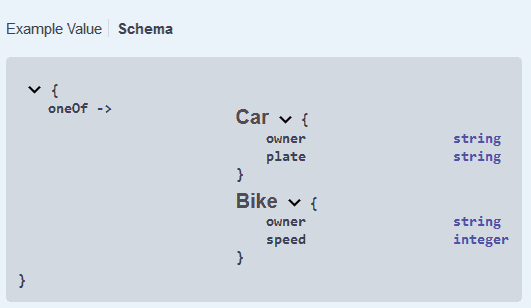
響應的 Schema 同樣正確地渲染:
4. 使用 OpenAPI 2 產生兩種不同響應
在 OpenAPI 2 中,<em >oneOf</em> 並不存在。因此,我們需要尋找一種替代方案。
4.1. 構建描述符文件
我們能做的最好的辦法是定義一個包裝對象,該對象將包含 Car 和 Bike 的所有屬性。 共享的屬性將進行要求,而僅屬於其中之一的屬性將保持可選狀態:
CarOrBike:
  description: a car will have an owner and a plate, whereas a bike has an owner and a speed
  type: object
  required:
    - owner
  properties:
    owner:
      type: string
    plate:
      type: string
    speed:
      type: integer
我們的API響應將是一個 CarOrBike 對象。 我們將在描述中提供更多信息。 由於我們無法提供各種示例,因此我們決定只提供一輛汽車的示例。
讓我們來查看生成的 api.yaml 文件:
swagger: 2.0.0
info:
  title: Demo api
  description: Demo api for the article 'specify two responses with same code based on optional parameter'
  version: 0.1.0
paths:
  /vehicle:
    get:
      responses:
        '200':
          description: Get a vehicle. Can contain either a Car or a Bike
          schema:
            $ref: '#/definitions/CarOrBike'
          examples:
            application/json:
              owner: baeldung
              plate: AEX305
              speed:
definitions:
  Car:
    type: object
    properties:
      owner:
        type: string
      plate:
        type: string
  Bike:
    type: object
    properties:
      owner:
        type: string
      speed:
        type: integer
  CarOrBike:
    description: a car will have an owner and a plate, whereas a bike has an owner and a speed
    type: object
    required:
      - owner
    properties:
      owner:
        type: string
      plate:
        type: string
      speed:
        type: integer
4.2. 生成 Java 類
讓我們調整 swagger-codegen 插件的配置,以解析 OpenAPI 2 文件。 為此,我們需要使用插件的 2.x 版本。 它也位於另一個包中:
<plugin>
    <groupId>io.swagger</groupId>
    <artifactId>swagger-codegen-maven-plugin</artifactId>
    <version>2.4.27</version>
    <executions>
        <execution>
            <goals>
                <goal>generate</goal>
            </goals>
            <configuration>
                <inputSpec>${project.basedir}/src/main/resources/static/api.yaml</inputSpec>
                <language>spring</language>
                <configOptions>
                    <java8>true</java8>
                    <interfaceOnly>true</interfaceOnly>
                </configOptions>
            </configuration>
        </execution>
    </executions>
</plugin>
現在讓我們來查看生成的文件的內容:
- CarOrBike 對象包含預期的字段,並且擁有 @NotNull 的所有者
- VehicleApi 定義了端點:對該端點的 GET 請求返回一個 CarOrBike 對象
4.3. 生成 Swagger UI 文檔
我們可以以與 3.3 中相同的方式生成文檔。
我們可以看到我們的描述已顯示:

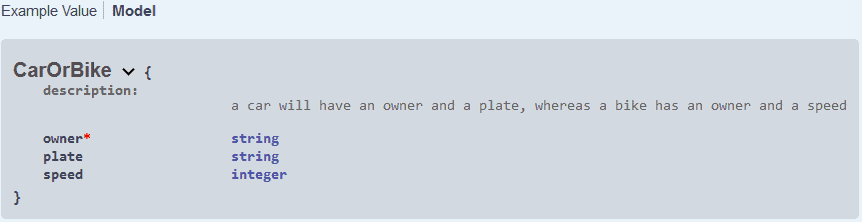
並且我們的 CarOrBike 模型按預期進行了描述:
5. 結論
在本教程中,我們學習瞭如何為能夠返回一個對象或另一個對象的端點編寫 OpenAPI 規範。我們使用 YAML 描述符通過 swagger-codegen 生成 Java 代碼,並通過 springdoc-openapi-ui 生成 Swagger UI 文檔。

