
1. 概述
文檔是構建任何健壯的 REST API 的關鍵組成部分。我們可以基於 OpenAPI 規範實現 API 文檔,並在 Spring 應用中使用 Swagger UI 進行可視化。
此外,API 端點可以使用 API 網關進行暴露,因此我們也需要將後端服務的 OpenAPI 文檔與網關服務集成。網關服務將提供所有 API 文檔的集中視圖。
在本文中,我們將學習如何在 Spring 應用中集成 OpenAPI,並使用 Spring Cloud Gateway 服務來暴露後端服務的 API 文檔。
2. 示例應用程序
讓我們假設我們需要構建一個簡單的微服務來獲取一些數據。
2.1 Maven 依賴
首先,我們將包含 spring-boot-starter-web 依賴:
<dependency>
    <groupId>org.springframework.boot</groupId>
    <artifactId>spring-boot-starter-web</artifactId>
    <version>3.3.2</version>
</dependency>
2.2. 實現 REST API
我們的後端應用程序將具有一個端點,用於返回 Product 數據。
首先,讓我們對 Product 類進行建模:
public class Product {
    private long id;
    private String name;
    //standard getters and setters
}
接下來,我們將實現 ProductController 及其 getProduct 端點:
@GetMapping(path = "/product/{id}")
public Product getProduct(@PathVariable("id") long productId){
    LOGGER.info("Getting Product Details for Product Id {}", productId);
    return productMap.get(productId);
}
3. 將 Spring 應用與 OpenAPI 集成
OpenAPI 3.0 規範可以通過使用 springdoc-openapi 啓動器項目,與 Spring Boot 3 集成。
3.1. Springdoc 依賴
Spring Boot 3.x 要求我們使用 版本 2 的 springdoc-openapi-starter-webmvc-ui 依賴:
<dependency>
    <groupId>org.springdoc</groupId>
    <artifactId>springdoc-openapi-starter-webmvc-ui</artifactId>
    <version>2.6.0</version>
</dependency>
3.2. 配置 OpenAPI 定義
我們可以通過使用少量 Swagger 註解來定製 OpenAPI 定義的細節,例如標題、描述和版本。
我們將配置 @OpenAPI Bean,並設置 @OpenAPIDefinition 註解:
@OpenAPIDefinition
@Configuration
public class OpenAPIConfig {

    @Bean
    public OpenAPI customOpenAPI() {
        return new OpenAPI()
          .servers(List.of(new Server().url("http://localhost:8080")))
          .info(new Info().title("Product Service API").version("1.0.0"));
    }
}
3.3. 配置 OpenAPI 和 Swagger UI 路徑
OpenAPI 和 Swagger UI 的默認路徑可以通過 springdoc-openapi 配置進行自定義。
我們將 Product 相關的路徑包含在 springdoc-openapi 的屬性中:
springdoc:
  api-docs:
    enabled: true
    path: /product/v3/api-docs
  swagger-ui:
    enabled: true
    path: /product/swagger-ui.html
我們可以通過將 OpenAPI 的 api-docs 和 Swagger UI 功能的 enabled 標誌設置為 false,在任何環境中禁用這些功能:
springdoc:
  api-docs:
    enabled: false
  swagger-ui:
    enabled: false
3.4. 添加 API 摘要
我們可以記錄 API 摘要、有效載荷詳情以及任何與安全相關的信息。
讓我們在 ProductController 類中包含 API 操作摘要的詳細信息:
@Operation(summary = "Get a product by its id")
    @ApiResponses(value = {
      @ApiResponse(responseCode = "200", description = "Found the product",
        content = { @Content(mediaType = "application/json",
          schema = @Schema(implementation = Product.class)) }),
      @ApiResponse(responseCode = "400", description = "Invalid id supplied",
        content = @Content),
      @ApiResponse(responseCode = "404", description = "Product not found",
        content = @Content) })
@GetMapping(path = "/product/{id}")
public Product getProduct(@Parameter(description = "id of product to be searched")
  @PathVariable("id") long productId){
在上述代碼中,我們設置了API操作摘要以及API請求和響應參數描述。
由於後端服務與OpenAPI集成,現在我們將實現一個API網關服務。
4. 使用 Spring Cloud Gateway 實現 API 網關
現在,我們將使用 Spring Cloud Gateway 支持實現一個 API 網關服務。該 API 網關服務將向我們的用户暴露 Product API。
4.1. Spring Cloud Gateway 依賴
首先,我們將包含 spring-cloud-starter-gateway 依賴:
<dependency>
    <groupId>org.springframework.cloud</groupId>
    <artifactId>spring-cloud-starter-gateway</artifactId>
    <version>4.1.5</version
</dependency>
4.2. 配置 API 路由
我們可以使用 Spring Cloud Gateway 的路由選項來暴露 Product 服務端點。
我們將配置 predicate 與 /product 路徑關聯,並將 uri 屬性設置為後端 URI http://
spring:
  cloud:
    gateway:
      routes:
        -   id: product_service_route
            predicates:
              - Path=/product/**
            uri: http://localhost:8081
我們應該注意到,在任何生產級別的應用程序中,Spring Cloud Gateway 應該將流量路由到後端服務的負載均衡 URL。
4.3. 測試 Spring Gateway API
讓我們運行 Product 和 Gateway 服務:
$ java -jar ./spring-backend-service/target/spring-backend-service-1.0.0-SNAPSHOT.jar
$ java -jar ./spring-cloud-gateway-service/target/spring-cloud-gateway-service-1.0.0-SNAPSHOT.jar現在,讓我們使用網關服務 URL 訪問 product</em/> 端點:
$ curl -v 'http://localhost:8080/product/100001'< HTTP/1.1 200 OK
< Content-Type: application/json
{"id":100001,"name":"Apple"}我們已如上所述測試,成功獲取後端 API 響應。
5. 將 Spring Gateway 服務集成到 OpenAPI 文檔中
現在,我們可以按照在 Product 服務中完成的那樣,將 Spring Gateway 應用程序與 OpenAPI 文檔集成。
5.1. <i/>springdoc-openapi </i>依賴項
我們將包含 <a href="https://mvnrepository.com/artifact/org.springdoc/springdoc-openapi-starter-webflux-ui/2.6.0">springdoc-openapi-starter-webflux-ui</a> 依賴項,而不是 `springdoc-openapi-starter-webmvc-ui </em/> 依賴項。
<dependency>
    <groupId>org.springdoc</groupId>
    <artifactId>springdoc-openapi-starter-webflux-ui</artifactId>
    <version>2.6.0</version>
</dependency>我們應注意的是,Spring Cloud Gateway 需要 webflux-ui 依賴項,因為它基於 Spring WebFlux 項目。
5.2. 配置 OpenAPI 定義
讓我們配置一個 OpenAPI Bean,並提供一些與摘要相關的細節:
@OpenAPIDefinition
@Configuration
public class OpenAPIConfig {

    @Bean
    public OpenAPI customOpenAPI() {
        return new OpenAPI().info(new Info()
          .title("API Gateway Service")
          .description("API Gateway Service")
          .version("1.0.0"));
    }
}
5.3. 配置 OpenAPI 和 Swagger UI 路徑
我們將自定義 Gateway 服務中的 api-docs.path 和 swagger-ui.urls 屬性,以進行定製:
springdoc:
  api-docs:
    enabled: true
    path: /v3/api-docs
  swagger-ui:
    enabled: true
    config-url: /v3/api-docs/swagger-config
    urls:
      -   name: gateway-service
          url: /v3/api-docs
5.4. 包含 OpenAPI URL 參考
為了從網關服務訪問 Product 服務上的 api-docs 端點,我們需要在上述配置中添加其路徑。
我們將包含 /product/v3/api-docs 路徑在上述 springdoc.swagger-ui.urls 屬性中:
springdoc:
  swagger-ui:
    urls:
      -   name: gateway-service
          url: /v3/api-docs
      -   name: product-service
          url: /product/v3/api-docs
6. 測試 API 網關應用程序中的 Swagger UI
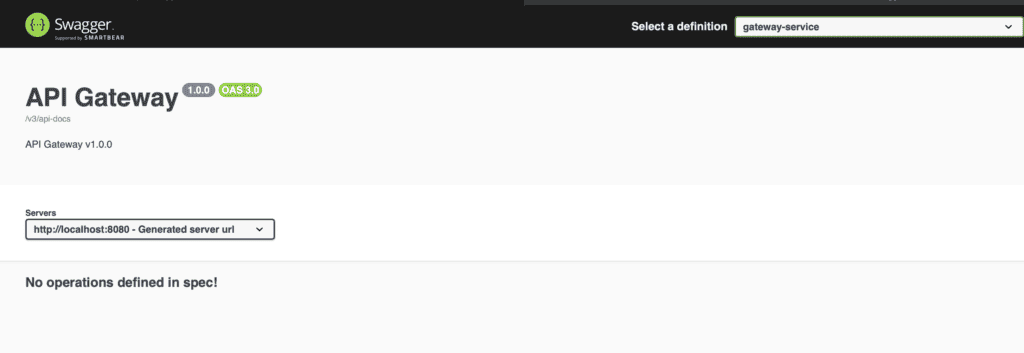
當同時運行這兩個應用程序時,可以通過訪問 http://localhost:8080/swagger-ui.html 來在 Swagger UI 中查看 API 文檔:
接下來,我們將通過右上角下拉菜單訪問 api-docs 產品服務:
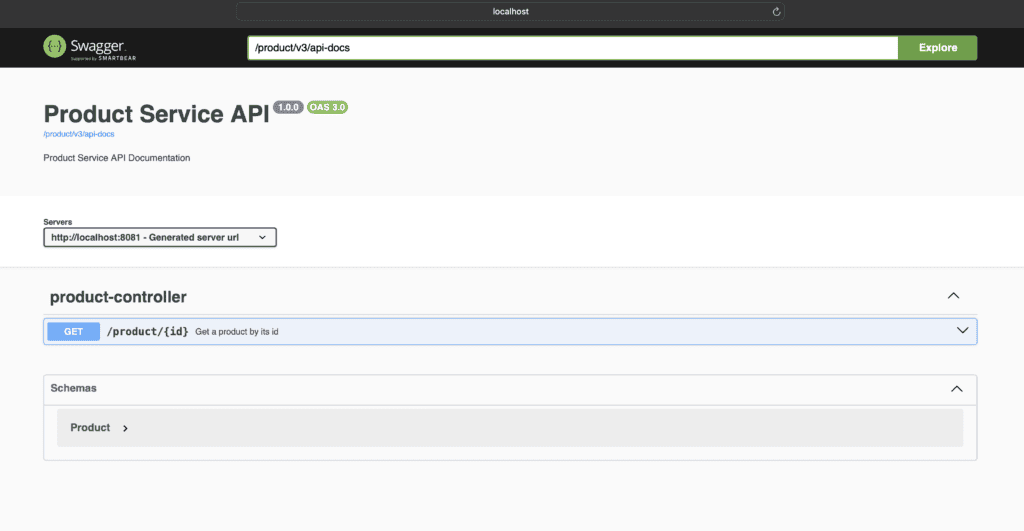
產品服務 API 端點
從上述頁面,我們可以查看和訪問產品服務 API 端點。
我們可以通過訪問 http://localhost:8080/product/v3/api-docs,以 JSON 格式訪問產品服務 API 文檔。
7. 結論
在本文中,我們學習瞭如何使用 springdoc-openapi 支持在 Spring 應用程序中實現 OpenAPI 文檔。
我們還看到了如何通過 Spring Cloud Gateway 服務暴露後端 API。
最後,我們演示瞭如何使用 Spring Gateway 服務的 Swagger UI 頁面訪問 OpenAPI 文檔。

