
1. 概述
使用大型語言模型,我們可以檢索大量有用的信息。我們可以學習關於任何事物中的許多新事實,並根據互聯網上現有的數據獲得答案。我們可以要求它們處理輸入數據並執行各種操作。但如果我們將模型要求使用 API 來準備輸出呢?
為了實現這一目標,我們可以使用函數調用。函數調用允許 LLM 與數據交互和操縱,執行計算或檢索超出其固有文本能力的各種信息。
在本文中,我們將探討函數調用的概念以及如何使用它將 LLM 集成到我們內部邏輯中。作為模型提供商,我們將使用 Mistral AI API。
2. Mistral AI API
Mistral AI 專注於為開發者和企業提供開放且可移植的生成式 AI 模型。 我們可以將其用於簡單的提示,以及函數調用集成。
2.1. 獲取 API 密鑰
要開始使用 Mistral API,首先需要獲取 API 密鑰。請前往 API 密鑰管理控制枱:

為了激活任何密鑰,您需要設置 計費配置 或如果可用,則使用試用期:
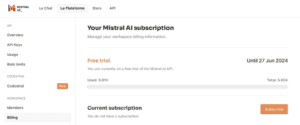
在一切就緒後,您可以點擊 創建新密鑰 按鈕以獲取 Mistral API 密鑰。
2.2. 使用示例
讓我們從一個簡單的提示開始。我們將要求 Mistral API 返回患者狀態列表。下面是如何實現這種調用的示例:
@Test
void givenHttpClient_whenSendTheRequestToChatAPI_thenShouldBeExpectedWordInResponse() throws IOException, InterruptedException {

    String apiKey = System.getenv("MISTRAL_API_KEY");
    String apiUrl = "https://api.mistral.ai/v1/chat/completions";
    String requestBody = "{"
      + "\"model\": \"mistral-large-latest\","
      + "\"messages\": [{\"role\": \"user\", "
      + "\"content\": \"What the patient health statuses can be?\"}]"
      + "}";

    HttpClient client = HttpClient.newHttpClient();
    HttpRequest request = HttpRequest.newBuilder()
      .uri(URI.create(apiUrl))
      .header("Content-Type", "application/json")
      .header("Accept", "application/json")
      .header("Authorization", "Bearer " + apiKey)
      .POST(HttpRequest.BodyPublishers.ofString(requestBody))
      .build();

    HttpResponse<String> response = client.send(request, HttpResponse.BodyHandlers.ofString());
    String responseBody = response.body();
    logger.info("Model response: " + responseBody);

    Assertions.assertThat(responseBody)
      .containsIgnoringCase("healthy");
}
我們創建了一個 HTTP 請求並將其發送到 /chat/completions 端點。 然後,我們使用 API 密鑰作為授權標頭的值。 正如預期的那樣,在響應中,我們看到元數據和內容本身:
Model response: {"id":"585e3599275545c588cb0a502d1ab9e0","object":"chat.completion",
"created":1718308692,"model":"mistral-large-latest",
"choices":[{"index":0,"message":{"role":"assistant","content":"Patient health statuses can be
categorized in various ways, depending on the specific context or medical system being used.
However, some common health statuses include:
1.Healthy: The patient is in good health with no known medical issues.
...
10.Palliative: The patient is receiving care that is focused on relieving symptoms and improving quality of life, rather than curing the underlying disease.",
"tool_calls":null},"finish_reason":"stop","logprobs":null}],
"usage":{"prompt_tokens":12,"total_tokens":291,"completion_tokens":279}}
使用 函數調用 的示例更為複雜,在調用之前需要進行大量的準備工作。我們將會在下一部分中進行探索。
3. Spring AI 集成
讓我們通過示例展示使用 Mistral API 以及函數調用的用法。 利用 Spring AI,我們可以避免大量的準備工作,讓框架替我們完成它。
3.1. 依賴項
所需的依賴項位於 Spring 里程碑倉庫。 讓我們將其添加到我們的 <em pom.xml</em> 中:
<repositories>
    <repository>
        <id>spring-milestones</id>
        <name>Spring milestones</name>
        <url>https://repo.spring.io/milestone</url>
    </repository>
</repositories>
現在,讓我們添加用於 Mistral API 集成的 依賴項:
<dependency>
    <groupId>org.springframework.ai</groupId>
    <artifactId>spring-ai-mistral-ai-spring-boot-starter</artifactId>
    <version>0.8.1</version>
</dependency>
3.2. 配置
現在,讓我們將我們之前獲取的 API 密鑰添加到 properties 文件中:
spring:
  ai:
    mistralai:
      api-key: ${MISTRAL_AI_API_KEY}
      chat:
        options:
          model: mistral-small-latest
這就是我們開始使用 Mistral API 所需的一切。
3.3. 基於單函數的使用案例
在我們的演示示例中,我們將創建一個函數,該函數根據患者 ID 返回患者的健康狀態。
首先,讓我們創建一個患者記錄:
public record Patient(String patientId) {
}
現在,讓我們為患者的健康狀況創建一個新的記錄:
public record HealthStatus(String status) {
}
在下一步中,我們將創建一個配置類:
@Configuration
public class MistralAIFunctionConfiguration {
    public static final Map<Patient, HealthStatus> HEALTH_DATA = Map.of(
      new Patient("P001"), new HealthStatus("Healthy"),
      new Patient("P002"), new HealthStatus("Has cough"),
      new Patient("P003"), new HealthStatus("Healthy"),
      new Patient("P004"), new HealthStatus("Has increased blood pressure"),
      new Patient("P005"), new HealthStatus("Healthy"));

    @Bean
    @Description("Get patient health status")
    public Function<Patient, HealthStatus> retrievePatientHealthStatus() {
        return (patient) -> new HealthStatus(HEALTH_DATA.get(patient).status());
    }
}
在這裏,我們指定了包含患者健康數據的集數據。此外,我們創建了 retrievePatientHealthStatus() 函數,該函數返回給定患者 ID 的健康狀態。
現在,讓我們通過在集成測試中調用該函數來測試它:
@Import(MistralAIFunctionConfiguration.class)
@ExtendWith(SpringExtension.class)
@SpringBootTest
public class MistralAIFunctionCallingManualTest {

    @Autowired
    private MistralAiChatModel chatClient;

    @Test
    void givenMistralAiChatClient_whenAskChatAPIAboutPatientHealthStatus_thenExpectedHealthStatusIsPresentInResponse() {

        var options = MistralAiChatOptions.builder()
          .withFunction("retrievePatientHealthStatus")
          .build();

        ChatResponse paymentStatusResponse = chatClient.call(
          new Prompt("What's the health status of the patient with id P004?",  options));

        String responseContent = paymentStatusResponse.getResult().getOutput().getContent();
        logger.info(responseContent);

        Assertions.assertThat(responseContent)
          .containsIgnoringCase("has increased blood pressure");
    }
}
我們已導入我們的 MistralAIFunctionConfiguration 類,並將我們的 retrievePatientHealthStatus() 函數添加到測試 Spring 上下文中。我們還注入了 MistralAiChatClient,該客户端將由 Spring AI starter 自動實例化。
在向聊天 API 的請求中,我們指定了包含患者 ID 和檢索健康狀態的函數名稱的提示文本。然後我們調用了 API 並驗證響應是否包含預期的健康狀態。
此外,我們記錄了整個響應文本,以下是內容:
The patient with id P004 has increased blood pressure.3.4. 包含多個函數的用例
我們還可以指定多個函數,AI 會根據我們發送的提示來決定使用哪個函數。
為了演示這一點,我們來擴展 HealthStatus 記錄:
public record HealthStatus(String status, LocalDate changeDate) {
}
我們已添加了狀態更改的最後一次時間。
現在讓我們修改配置類:
@Configuration
public class MistralAIFunctionConfiguration {
    public static final Map<Patient, HealthStatus> HEALTH_DATA = Map.of(
      new Patient("P001"), new HealthStatus("Healthy",
        LocalDate.of(2024,1, 20)),
      new Patient("P002"), new HealthStatus("Has cough",
        LocalDate.of(2024,3, 15)),
      new Patient("P003"), new HealthStatus("Healthy",
        LocalDate.of(2024,4, 12)),
      new Patient("P004"), new HealthStatus("Has increased blood pressure",
        LocalDate.of(2024,5, 19)),
      new Patient("P005"), new HealthStatus("Healthy",
        LocalDate.of(2024,6, 1)));

    @Bean
    @Description("Get patient health status")
    public Function<Patient, String> retrievePatientHealthStatus() {
        return (patient) -> HEALTH_DATA.get(patient).status();
    }

    @Bean
    @Description("Get when patient health status was updated")
    public Function<Patient, LocalDate> retrievePatientHealthStatusChangeDate() {
        return (patient) -> HEALTH_DATA.get(patient).changeDate();
    }
}
我們已為每個狀態項填充了變更日期。我們還創建了 retrievePatientHealthStatusChangeDate() 函數,該函數返回狀態變更日期信息。
讓我們看看如何使用我們的兩個新函數與 Mistral API 結合使用:
@Test
void givenMistralAiChatClient_whenAskChatAPIAboutPatientHealthStatusAndWhenThisStatusWasChanged_thenExpectedInformationInResponse() {
    var options = MistralAiChatOptions.builder()
      .withFunctions(
        Set.of("retrievePatientHealthStatus",
          "retrievePatientHealthStatusChangeDate"))
      .build();

    ChatResponse paymentStatusResponse = chatClient.call(
      new Prompt(
        "What's the health status of the patient with id P005",
        options));

    String paymentStatusResponseContent = paymentStatusResponse.getResult()
      .getOutput().getContent();
    logger.info(paymentStatusResponseContent);

    Assertions.assertThat(paymentStatusResponseContent)
      .containsIgnoringCase("healthy");

    ChatResponse changeDateResponse = chatClient.call(
      new Prompt(
        "When health status of the patient with id P005 was changed?",
        options));

    String changeDateResponseContent = changeDateResponse.getResult().getOutput().getContent();
    logger.info(changeDateResponseContent);

    Assertions.assertThat(paymentStatusResponseContent)
      .containsIgnoringCase("June 1, 2024");
}在這種情況下,我們指定了兩個函數名稱併發送了兩個提示。首先,我們詢問了患者的健康狀況。然後我們詢問了該狀況何時發生變化。我們已驗證結果包含預期信息。除此之外,我們記錄了所有響應,以下是其外觀:
The patient with id P005 is currently healthy.
The health status of the patient with id P005 was changed on June 1, 2024.
4. 結論
函數調用是一個強大的工具,可以擴展 LLM 的功能。我們還可以利用它將 LLM 與我們的邏輯集成。
在本教程中,我們探討了如何通過調用一個或多個函數來實現基於 LLM 的流程。採用這種方法,我們可以實現與 AI API 集成的現代應用程序。

