
1. 簡介
RESTHeart 是一個基於 Java 的框架,允許我們快速地在 MongoDB 之上構建 HTTP API。它使我們能夠以最小的設置將 MongoDB 集合暴露為 REST 和 GraphQL API,同時仍然允許我們控制所需的內容。
在本教程中,我們將快速瞭解 RESTHeart API 框架。
2. 什麼是 RESTHeart?
RESTHeart 提供了一個基於 MongoDB 的開源 API 服務器。它會自動將我們的集合暴露為 REST 和 GraphQL 端點,允許我們無需編寫任何代碼即可創建 API。
我們出 короб 獲得:
- 對 HTTP 和 GraphQL 的完整 CRUD 支持
- 基於角色的訪問控制和身份驗證
- 內置的管理員 API 用於用户和角色管理
- 通過 Java 插件或配置自定義行為的擴展點
這為構建基於 HTTP 的 API 提供了一種零代碼解決方案,從而實現快速實施。當需要時,我們還可以集成自定義 Java 代碼以實現不在 короб 提供的額外功能。
3. 運行 RESTHeart
如果想要在本地運行 RESTHeart,則需要安裝 Java 21 或更高版本。 此外,還需要下載 RESTHeart 發行版。 下載並解壓後,我們可以立即通過運行 restheart.jar 啓動服務:
$ java -jar restheart.jar
17:39:17.943 [main] INFO  org.restheart.Bootstrapper - Starting RESTHeart instance default
17:39:17.945 [main] INFO  org.restheart.Bootstrapper - Version 8.4.0
.....
17:39:19.188 [main] INFO  org.restheart.Bootstrapper - RESTHeart started
在未進行任何配置的情況下,它將嘗試使用可訪問 127.0.0.1:27017 的 MongoDB,且無需憑據。
或者,我們提供了一個 Docker 鏡像,可用於運行 RESTHeart。 這還允許我們運行一個 Docker Compose 設置,其中包含 MongoDB,從而可以將其全部作為一個堆棧啓動。 為此,我們需要一個 docker-compose.yml 文件:
$ cat docker-compose.yml
services:
  mongodb:
    image: mongo:latest
    container_name: mongodb
    ports:
      - "27017:27017"
    networks:
      - mongo-restheart-network

  restheart:
    image: softinstigate/restheart:latest
    container_name: restheart
    ports:
      - "8080:8080"
    networks:
      - mongo-restheart-network
    environment:
      MONGO_URI: mongodb://mongodb:27017
    depends_on:
      - mongodb

networks:
  mongo-restheart-network:
    driver: bridge
我們現在可以使用 Docker Compose 啓動服務,準備就緒:
$ docker compose up -d
[+] Running 3/3
   Network restheart_mongo-restheart-network  Created
   Container mongodb                          Started
   Container restheart                        Started
一旦一切啓動,我們就可以通過調用服務器上的 /ping 端點來測試配置:
$ curl localhost:8080/ping
{"message": "Greetings from RESTHeart!", "client_ip": "192.168.65.1", "host": "localhost:8080", "version": "8.4.0"}
此時,我們已經擁有一個功能完整的服務。
4. 身份驗證與用户
我們對 RESTHeart 服務所做的絕大多數 API 調用都需要身份驗證,RESTHeart 會自動處理這些身份驗證。例如,如果我們對根資源發出未進行身份驗證的請求,則我們會收到一個 HTTP 401 未授權 響應:
$ curl -v localhost:8080/
> GET / HTTP/1.1
>
< HTTP/1.1 401 Unauthorized
< WWW-Authenticate: Basic realm="RESTHeart Realm"
默認情況下,用户記錄都存儲在我們的 MongoDB 數據庫中,位於 users 集合中。 如果我們啓動 RESTHeart 並針對一個空數據庫,此集合將自動創建,並且一個 admin 用户將被自動添加到其中:

雖然密碼已安全地進行哈希處理,並且無法查看,但默認憑據由用户名 admin 和密碼 secret 組成。 我們可以使用這些憑據再次發出請求:
$ curl -v -u admin:secret localhost:8080/
> GET / HTTP/1.1
> Authorization: Basic YWRtaW46c2VjcmV0
>
< HTTP/1.1 200 OK
< Content-Type: application/json
<
["acl", "users"]
現在它已經正確工作,並且我們得到了預期的響應。
5. 使用 RESTHeart 進行 CRUD 操作
RESTHeart 自動將我們的數據庫中的 MongoDB 集合暴露出來,以便我們能夠通過標準的 REST 和 GraphQL API 進行讀取和操作,並減少開發工作量。
5.1. REST API
RESTHeart 暴露了一個標準的 REST API,其中包含每個集合的標準 URL 模式:
- GET /
– 搜索集合 - GET /
/ – 從集合中獲取記錄 - POST /
– 在集合中創建新記錄 - PUT /
/ – 替換集合中的記錄 - PATCH /
/ – 在集合中修補記錄 - DELETE /
/ – 從集合中刪除記錄
我們還可以通過發送特殊請求創建新的集合。 要執行此操作,我們直接向集合的端點發出 PUT 請求:
$ curl -v -u admin:secret -X PUT localhost:8080/posts
> PUT /posts HTTP/1.1
>
< HTTP/1.1 200 OK
< Content-Type: application/json
< Content-Length: 0
<一旦我們收集了一組數據,讓我們使用一個 POST 請求在其中創建一個新的記錄:
$ curl -v -u admin:secret -X POST localhost:8080/posts -d '{"title": "Introduction to RESTHeart", "author": "Baeldung"}' -H "Content-Type: application/json"
> POST /posts HTTP/1.1
> Content-Type: application/json
> Content-Length: 60
>
< HTTP/1.1 201 Created
< Location: http://localhost:8080/posts/681a139012d5c00fcb674298
這不會返回實際的記錄,但它會提供一個 位置 (Location) 標頭,指向該記錄。 同樣,該信息可以直接在數據庫中看到:
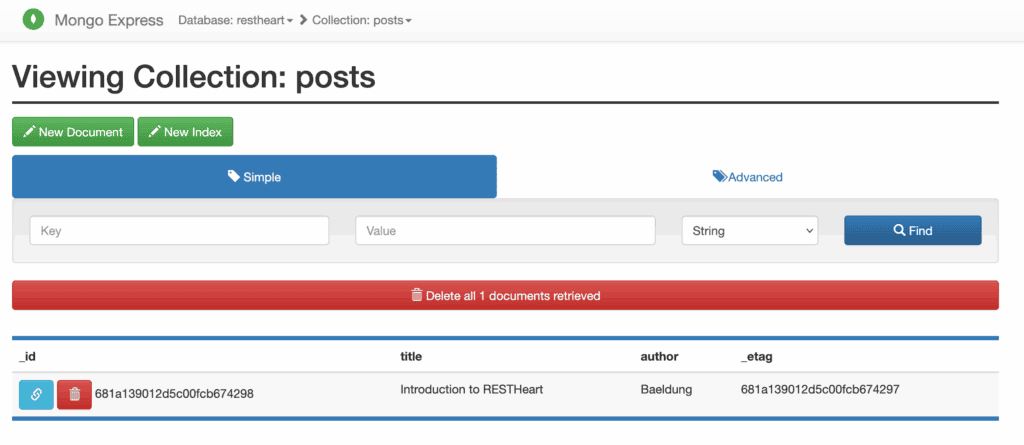
我們可以使用 GET 請求並指定 ID 來檢索該記錄:
$ curl -v -u admin:secret localhost:8080/posts/681a139012d5c00fcb674298
> GET /posts/681a139012d5c00fcb674298 HTTP/1.1
>
< HTTP/1.1 200 OK
< Content-Type: application/json
< Content-Length: 152
<
{
  "_id": { "$oid": "681a139012d5c00fcb674298" },
  "title": "Introduction to RESTHeart",
  "author": "Baeldung",
  "_etag": { "$oid": "681a139012d5c00fcb674297" }
}
我們還可以通過向整個集合發送 GET 請求來選擇整個集合:
$ curl -v -u admin:secret localhost:8080/posts
> GET /posts HTTP/1.1
>
< HTTP/1.1 200 OK
< Content-Type: application/json
< Content-Length: 154
<
[
  {
    "_id": { "$oid": "681a139012d5c00fcb674298" },
    "title": "Introduction to RESTHeart",
    "author": "Baeldung",
    "_etag": { "$oid": "681a139012d5c00fcb674297" }
  }
]
當然,以下是翻譯後的內容:
正如預期的那樣,我們還可以使用 PUT、PATCH 和 DELETE 調用來更新和刪除這些記錄:
$ curl -v -u admin:secret -X PUT localhost:8080/posts/681a139012d5c00fcb674298 -H "Content-Type: application/json" -d '{"title": "Intro to RESTHeart", "author": "Baeldung"}'
> PUT /posts/681a139012d5c00fcb674298 HTTP/1.1
> Content-Type: application/json
> Content-Length: 53
>
< HTTP/1.1 200 OK
< Content-Type: application/json
< Content-Length: 0
<
這些都沒有返回結果,但如果我們再次查詢,結果會立即可用。
5.2. GraphQL API
除了 REST API 之外,RESTHeart 還可以讓我們通過 GraphQL API 暴露我們的數據。與 REST API 不同,這需要一些初始配置才能使一切都按預期工作。
所有 GraphQL API 都由 gql-apps 集合中的記錄定義。因此,首先我們需要創建它:
$ curl -v -u admin:secret -X PUT localhost:8080/gql-apps我們還需要在這一集合中創建一個特殊的記錄,其中包含我們的 GraphQL API 定義。為了創建一個能夠暴露我們之前工作中的 Posts 的 API,配置可能如下所示:
$ cat posts.schema
{
    "_id": "restheart-posts",
    "descriptor": {
        "name": "restheart-posts",
        "description": "RESTHeart Tutorial",
        "enabled": true,
        "uri": "restheart-posts"
    },
    "schema": "type Post { title: String author: String } type Query { posts: [Post] }",
    "mappings": {
        "Post": {
            "name": "name",
            "author": "author"
        },
        "Query": {
            "posts": {
                "db": "restheart",
                "collection": "posts"
            }
        }
    }
}描述符字段提供 RESTHeart 使用的一些定義,用於管理 API。 在這裏最重要的是URI字段,稍後我們會用到它。 模式字段是我們的 API 的完整 GraphQL 模式定義,使用 GraphQL 模式定義語言編寫。映射字段告訴 RESTHeart 如何在 GraphQL API 和 MongoDB 集合之間進行映射。 在這裏,我們定義了一個Post類型,具有name和author字段,以及一個Query類型,具有posts字段,該字段映射到我們數據庫中的posts集合。
我們以之前的方式創建該記錄:
$ curl -v -u admin:secret -X POST localhost:8080/gql-apps -d "@posts.schema" -H "Content-Type: application/json"我們完成這些步驟後,我們的 GraphQL API 已經準備好使用。我們已將我們的 uri 字段設置為 restheart-posts,這意味着我們的 API 在 graphql/restheart-posts 上暴露。
$ curl -v -u admin:secret -X POST localhost:8080/graphql/restheart-posts -d "{ posts { title author } }" -H "Content-Type: application/graphql"
> POST /graphql/restheart-posts HTTP/1.1
> Content-Type: application/graphql
> Content-Length: 26
>
* upload completely sent off: 26 bytes
< HTTP/1.1 200 OK
< Content-Type: application/graphql-response+json
< Content-Length: 83
<
{
  "data": {
    "posts": [
      {
        "title": "Intro to RESTHeart",
        "author": "Baeldung"
      }
    ]
  }
}
我們可以立刻看到這與我們 REST API 管理的數據完全相同。
6. 結論
在本文中,我們對 RESTHeart 及其功能進行了簡要的概述。 憑藉這個框架,可以實現更多目標,因此,在您需要創建 HTTP API 時,不妨一探究竟。

