1. 概述
模型上下文協議 (MCP) 允許人工智能模型通過安全的 API 訪問業務數據。 當我們構建處理敏感信息的 MCP 服務器時,需要適當的授權來控制誰可以訪問哪些數據。
OAuth2 提供基於令牌的安全機制,非常適合與 MCP 系統配合使用。 相反於構建自定義身份驗證,我們可以使用 OAuth2 標準來保護我們的 MCP 服務器並管理客户端訪問。
在本文中,我們將探討如何使用 Spring AI 和 OAuth2 來安全地保護 MCP 服務器和客户端。 我們將構建一個包含三個組件的完整示例:一個授權服務器、一個帶有計算器工具的受保護的 MCP 服務器以及一個處理用户和系統請求的客户端。
2. MCP 安全架構
為了安全地保護 MCP 服務器,重要的是要理解我們如何在 MCP 服務器之前集成一個授權服務器。
我們的系統包括一個用於頒發帶有適當權限的 JWT 令牌的授權服務器,一個用於驗證令牌和控制計算器工具訪問權限的 MCP 服務器。 此外,還有一個 MCP 客户端,用於獲取令牌並管理不同請求類型的身份驗證:
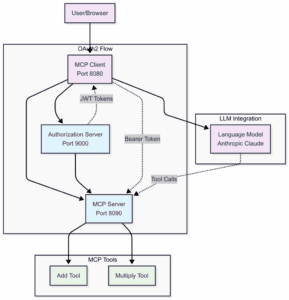
MCP 服務器充當 OAuth2 資源服務器。它們在處理任何操作之前,會在請求標頭中檢查 JWT 令牌。 這將安全問題與業務邏輯分開。客户端從 OAuth2 授權服務器獲取訪問令牌。然後,客户端在 MCP 請求中包含這些令牌。最後,MCP 服務器在允許操作之前驗證令牌。 這樣我們的組件將工作:
3. 構建授權服務器
我們將從授權服務器開始,因為其他組件依賴於它。
3.1. 添加依賴項
我們需要添加 OAuth2 授權服務器 依賴項才能使用它:
<dependency>
    <groupId>org.springframework.boot</groupId>
    <artifactId>spring-boot-starter-oauth2-authorization-server</artifactId>
</dependency>
<dependency>
    <groupId>org.springframework.boot</groupId>
    <artifactId>spring-boot-starter-web</artifactId>
</dependency>
3.2. 配置授權服務器
讓我們在 application.yml 中配置服務器:
server:
  port: 9000

spring:
  security:
    user:
      name: user
      password: password
    oauth2:
      authorizationserver:
        client:
          oidc-client:
            registration:
              client-id: "mcp-client"
              client-secret: "{noop}mcp-secret"
              client-authentication-methods:
                - "client_secret_basic"
              authorization-grant-types:
                - "authorization_code"
                - "client_credentials"
                - "refresh_token"
              redirect-uris:
                - "http://localhost:8080/authorize/oauth2/code/authserver"
              scopes:
                - "openid"
                - "profile"
                - "calc.read"
                - "calc.write"
這將在端口 9000 上設置一個授權服務器,該服務器支持用户和系統之間的授權代碼流程(授權代碼流程)和客户端憑據流程(客户端憑據流程)
4. Securing the MCP Server
現在我們將創建一個需要 OAuth2 令牌並提供計算器工具的 MCP 服務器。
4.1. Configuring Dependencies for MCP Server
現在,讓我們添加 OAuth2 資源服務器 支持:
<dependency>
    <groupId>org.springframework.ai</groupId>
    <artifactId>spring-ai-starter-mcp-server-webmvc</artifactId>
    <version>1.0.0-M7</version>
</dependency>

<dependency>
    <groupId>org.springframework.boot</groupId>
    <artifactId>spring-boot-starter-oauth2-resource-server</artifactId>
</dependency>
4.2. Server Configuration
讓我們將 MCP 服務器配置為 OAuth2 資源服務器:
server.port=8090

spring.security.oauth2.resourceserver.jwt.issuer-uri=http://localhost:9000

spring.ai.mcp.server.enabled=true
spring.ai.mcp.server.name=mcp-calculator-server
spring.ai.mcp.server.version=1.0.0
spring.ai.mcp.server.stdio=false
Spring Boot 自動處理 JWT 驗證,當我們設置 issuer URI 時。 每個請求到我們的 MCP 服務器現在都需要在 Authorization header 中包含有效的 JWT 令牌。
4.3. Creating MCP Tools
LLMs 通常在數學方面表現不佳。因此,我們需要為它們提供訪問可以根據請求計算結果的工具:
@Tool(description = "Add two numbers")
public CalculationResult add(
  @ToolParam(description = "First number") double a,
  @ToolParam(description = "Second number") double b) {
      double result = a + b;
      return new CalculationResult("addition", a, b, result);
}

@Tool(description = "Multiply two numbers")
public CalculationResult multiply(
  @ToolParam(description = "First number") double a,
  @ToolParam(description = "Second number") double b) {
      double result = a * b;
      return new CalculationResult("multiplication", a, b, result);
}
安全配置自動保護所有 MCP 工具。 沒有有效的令牌的請求將被拒絕。這些工具被添加到上下文中,並在每個用户查詢上提供給 LLM。然後 LLM 決定為用户查詢使用哪個工具以響應。
5. Building the MCP Client
現在,我們需要客户端來處理最複雜的部分,因為它需要處理用户請求和系統初始化。
5.1. 客户端的依賴項
我們首先添加 mcp-client 和 oauth2-client 依賴項:
<dependency>
    <groupId>org.springframework.ai</groupId>
    <artifactId>spring-ai-starter-mcp-client-webflux</artifactId>
</dependency>
<dependency>
    <groupId>org.springframework.boot</groupId>
    <artifactId>spring-boot-starter-oauth2-client</artifactId>
</dependency>
5.2. 客户端配置
現在,我們需要在 application.properties 中配置兩個 OAuth2 客户端註冊:
server.port=8080

spring.ai.mcp.client.sse.connections.server1.url=http://localhost:8090
spring.ai.mcp.client.type=SYNC

spring.security.oauth2.client.provider.authserver.issuer-uri=http://localhost:9000

# OAuth2 Client for User-Initiated Requests (Authorization Code Grant)
spring.security.oauth2.client.registration.authserver.client-id=mcp-client
spring.security.oauth2.client.registration.authserver.client-secret=mcp-secret
spring.security.oauth2.client.registration.authserver.authorization-grant-type=authorization_code
spring.security.oauth2.client.registration.authserver.provider=authserver
spring.security.oauth2.client.registration.authserver.scope=openid,profile,mcp.read,mcp.write
spring.security.oauth2.client.registration.authserver.redirect-uri={baseUrl}/authorize/oauth2/code/{registrationId}

# OAuth2 Client for Machine-to-Machine Requests (Client Credentials Grant)
spring.security.oauth2.client.registration.authserver-client-credentials.client-id=mcp-client
spring.security.oauth2.client.registration.authserver-client-credentials.client-secret=mcp-secret
spring.security.oauth2.client.registration.authserver-client-credentials.authorization-grant-type=client_credentials
spring.security.oauth2.client.registration.authserver-client-credentials.provider=authserver
spring.security.oauth2.client.registration.authserver-client-credentials.scope=mcp.read,mcp.write

spring.ai.anthropic.api-key=${ANTHROPIC_API_KEY}
我們需要為不同的認證流程註冊兩個客户端。 authserver 註冊使用授權碼流程,用於用户發起請求。 authserver-client-credentials 註冊使用客户端憑據流程,用於應用程序啓動。
5.3. 安全配置
現在,讓我們使用 Spring Security 處理 OAuth2:
@Bean
WebClient.Builder webClientBuilder(McpSyncClientExchangeFilterFunction filterFunction) {
    return WebClient.builder()
      .apply(filterFunction.configuration());
}

@Bean
SecurityFilterChain securityFilterChain(HttpSecurity http) throws Exception {
    return http.authorizeHttpRequests(auth -> auth.anyRequest().permitAll())
      .oauth2Client(Customizer.withDefaults())
      .csrf(CsrfConfigurer::disable)
      .build();
}
5.4. 選擇正確的令牌
挑戰在於選擇適用於每個請求的正確令牌。 我們需要一個自定義 ExchangeFilterFunction 實現,用於檢測請求上下文:
@Component
public class McpSyncClientExchangeFilterFunction implements ExchangeFilterFunction {

    private final ClientCredentialsOAuth2AuthorizedClientProvider clientCredentialTokenProvider = new ClientCredentialsOAuth2AuthorizedClientProvider();
    private final ServletOAuth2AuthorizedClientExchangeFilterFunction delegate;
    private final ClientRegistrationRepository clientRegistrationRepository;
    private static final String AUTHORIZATION_CODE_CLIENT_REGISTRATION_ID = "authserver";
    private static final String CLIENT_CREDENTIALS_CLIENT_REGISTRATION_ID = "authserver-client-credentials";

    public McpSyncClientExchangeFilterFunction(OAuth2AuthorizedClientManager clientManager,
        ClientRegistrationRepository clientRegistrationRepository) {
        this.delegate = new ServletOAuth2AuthorizedClientExchangeFilterFunction(clientManager);
        this.delegate.setDefaultClientRegistrationId(AUTHORIZATION_CODE_CLIENT_REGISTRATION_ID);
        this.clientRegistrationRepository = clientRegistrationRepository;
    }

    @Override
    public Mono<ClientResponse> filter(ClientRequest request, ExchangeFunction next) {
        if (RequestContextHolder.getRequestAttributes() instanceof ServletRequestAttributes) {
            return this.delegate.filter(request, next);
        }
        else {
            var accessToken = getClientCredentialsAccessToken();
            var requestWithToken = ClientRequest.from(request)
              .headers(headers -> headers.setBearerAuth(accessToken))
              .build();
            return next.exchange(requestWithToken);
        }
    }

    private String getClientCredentialsAccessToken() {
        var clientRegistration = this.clientRegistrationRepository
          .findByRegistrationId(CLIENT_CREDENTIALS_CLIENT_REGISTRATION_ID);

        var authRequest = OAuth2AuthorizationContext.withClientRegistration(clientRegistration)
          .principal(new AnonymousAuthenticationToken("client-credentials-client", "client-credentials-client",
             AuthorityUtils.createAuthorityList("ROLE_ANONYMOUS")))
          .build();
        return this.clientCredentialTokenProvider.authorize(authRequest).getAccessToken().getTokenValue();
    }

    public Consumer<WebClient.Builder> configuration() {
        return builder -> builder.defaultRequest(this.delegate.defaultRequest()).filter(this);
    }
}
過濾器檢查是否存在活動 Web 請求。 如果存在,則使用用户的授權碼令牌。 如果沒有(例如在應用程序啓動期間),則使用客户端憑據。
6. 使用安全化的 MCP 系統
現在我們已經涵蓋了所有組件,讓我們看看如何有效地使用安全化的 MCP 系統。
6.1. 創建 ChatClient
讓我們用 ChatClient 將所有東西連接起來:
@Bean
ChatClient chatClient(ChatClient.Builder chatClientBuilder, List<McpSyncClient> mcpClients) {
    return chatClientBuilder.defaultToolCallbacks(new SyncMcpToolCallbackProvider(mcpClients))
      .build();
}
6.2. 發送請求
現在我們可以正常使用 ChatClient。安全性會自動處理:
@GetMapping("/calculate")
public String calculate(@RequestParam String expression, @RegisteredOAuth2AuthorizedClient("authserver") OAuth2AuthorizedClient authorizedClient) {
    String prompt = String.format("Please calculate the following mathematical expression using the available calculator tools: %s", expression);

    return chatClient.prompt()
      .user(prompt)
      .call()
      .content();
}
在啓動過程中,MCP 客户端初始化使用客户端憑據令牌。當用户通過 Web 界面發送請求時,它使用他們的授權碼令牌。
7. 驗證配置
為了理解應用程序的工作原理,我們需要查看它產生的結果。 在啓動任何應用程序之前,必須為 LLM 設置所需的環境變量。 啓動後,首先在 9000 端口啓動授權服務器。 這非常重要,因為所有其他模塊都依賴於授權服務器。 然後在 8090 端口啓動 MCP 服務器,最後在 8080 端口啓動 MCP 客户端。
測試完整流程變得簡單明瞭。 我們需要訪問 MCP 客户端端點,然後嘗試執行以下操作:
http://{base_url}:8080/calculate?expression=15+25客户端將從授權服務器獲取令牌,並使用令牌調用 MCP 服務器,然後返回計算結果。 確保我們使用配置文件的指定憑據登錄到授權服務器。
8. 結論
在本教程中,我們探討了 OAuth2 如何通過基於令牌的授權為 MCP 系統提供強大的安全保障。Spring Security 的 OAuth2 支持能夠實現良好的保護,同時配置量極少。通過分離授權服務器、MCP 服務器和 MCP 客户端,我們構建了一個架構,其中每個組件專注於自身的職責,從而提供了靈活性。

