
1. 引言
微軟 Azure 現在具有相當完善的 Java 支持。
在本教程中,我們將逐步演示如何使我們的 Spring Boot 應用程序在 Azure 平台上運行。
2. Maven 依賴和配置
首先,我們需要一個 Azure 訂閲才能使用其中的雲服務;目前,您可以註冊一個免費賬户 這裏。
接下來,登錄平台並使用 Azure CLI 創建服務主體:
> az login
To sign in, use a web browser to open the page \
https://microsoft.com/devicelogin and enter the code XXXXXXXX to authenticate.
> az ad sp create-for-rbac --name "app-name" --password "password"
{
"appId": "aaaaaaaa-aaaa-aaaa-aaaa-aaaaaaaaaaaa",
"displayName": "app-name",
"name": "http://app-name",
"password": "password",
"tenant": "tttttttt-tttt-tttt-tttt-tttttttttttt"
}現在,我們將在 Maven 的 settings.xml
中配置 Azure 服務主體身份驗證設置,具體步驟如下,在 <servers> 下方:<server>
<id>azure-auth</id>
<configuration>
<client>aaaaaaaa-aaaa-aaaa-aaaa-aaaaaaaaaaaa</client>
<tenant>tttttttt-tttt-tttt-tttt-tttttttttttt</tenant>
<key>password</key>
<environment>AZURE</environment>
</configuration>
</server>我們將依賴上述身份驗證配置來上傳我們的 Spring Boot 應用程序到 Microsoft 平台,使用 azure-webapp-maven-plugin。
請將以下 Maven 插件添加到 pom.xml 中:
<plugin>
    <groupId>com.microsoft.azure</groupId>
    <artifactId>azure-webapp-maven-plugin</artifactId>
    <version>1.1.0</version>
    <configuration>
        <!-- ... -->
    </configuration>
</plugin>
我們可以查看最新發布版本 在此處。
此插件有許多可配置的屬性,將在以下介紹中進行説明。
3. 將 Spring Boot 應用部署到 Azure
現在我們已經設置了環境,接下來我們將嘗試將我們的 Spring Boot 應用程序部署到 Azure。
我們的應用程序在訪問“/hello”時,會返回“hello azure!”。
@GetMapping("/hello")
public String hello() {
    return "hello azure!";
}
該平台現在允許部署 Java Web 應用,支持 Tomcat 和 Jetty。藉助 azure-webapp-maven-plugin,我們可以將應用程序作為默認(ROOT)應用程序直接部署到支持的 Web 容器中,或者通過 FTP 進行部署。
請注意,由於我們將應用程序部署到 Web 容器中,因此應將其打包為 WAR 歸檔文件。作為快速提醒,我們有一篇文章介紹瞭如何將 Spring Boot WAR 部署到 Tomcat。
3.1. Web 容器部署
如果我們的目標是將應用程序部署到 Windows 實例上的 Tomcat 中,我們將使用以下配置針對 azure-webapp-maven-plugin:
<configuration>
    <javaVersion>1.8</javaVersion>
    <javaWebContainer>tomcat 8.5</javaWebContainer>
    <!-- ... -->
</configuration>
對於 Linux 實例,請嘗試以下配置:
<configuration>
    <linuxRuntime>tomcat 8.5-jre8</linuxRuntime>
    <!-- ... -->
</configuration>
讓我們不要忘記 Azure 身份驗證:
<configuration>
    <authentication>
        <serverId>azure-auth</serverId>
    </authentication>
    <appName>spring-azure</appName>
    <resourceGroup>baeldung</resourceGroup>
    <!-- ... -->
</configuration>
當我們將應用程序部署到 Azure 時,它將顯示為 App Service。因此,我們在此指定了 現在,我們準備使用 azure-webapp:deploy Maven 目標來執行部署,並會看到以下輸出: 現在我們可以訪問https://spring-baeldung.azurewebsites.net/hello並查看響應:‘hello azure!’。 在部署過程中,Azure 自動為我們創建了一個 App Service Plan。請參閲 官方文檔以獲取有關 Azure App Service 計劃的詳細信息。如果我們已經擁有一個 App Service plan,我們可以將 appServicePlanName 屬性設置為避免創建新的 plan: 為了通過 FTP 部署,可以使用以下配置: 在上述配置中,我們將插件配置為在 ${project.basedir}/target 目錄下查找 WAR 文件,並將其部署到 Tomcat 容器的 webapps 目錄下。 假設我們的最終制品名為 azure-0.1.war,在開始部署後,我們將會看到類似以下的輸出: 請注意,我們沒有將應用程序部署為默認的 Tomcat Web 應用程序,因此只能通過 ‘https://spring-baeldung.azurewebsites.net/azure-0.1/hello’ 訪問它。服務器將如預期返回 ‘hello azure!’。 通常情況下,我們的 Spring Boot 應用程序需要數據訪問來提供服務。Azure 現在支持 SQL Server、MySQL 和 PostgreSQL 等數據庫。 為了簡化操作,我們將使用 Azure 的 In-App MySQL 作為數據源,因為它的配置與其它 Azure 數據庫服務非常相似。 由於啓用 In-App MySQL 的 Web 應用沒有一個一鍵命令,因此首先需要使用 CLI 創建 Web 應用: 然後,在門户中啓用 App 內置的 MySQL: 啓用 App 內置的 MySQL 後,我們可以在名為 MYSQLCONNSTR_xxx.txt 的文件中找到默認數據庫、數據源 URL 和默認帳户信息,該文件位於文件系統下的 /home/data/mysql 目錄中。 在此,為了演示目的,我們創建了一個 User 實體以及兩個端點,用於 註冊 和 列出 User: 我們將在本地環境中使用 H2 數據庫,並在 Azure 上將其切換為 MySQL。通常,我們會在 application.properties 文件中配置數據源屬性: 在 Azure 部署時,我們需要配置 azure-webapp-maven-plugin 在 <appSettings> 中 。 現在我們可以開始部署: 我們可以從日誌中看到部署已完成。 讓我們測試我們的新端點: 服務器的響應説明了一切。它已成功! 在上一節中,我們展示瞭如何將應用程序部署到 Servlet 容器(這裏是 Tomcat)。那麼,如何將應用程序部署為獨立的、可運行的 JAR 包呢? 目前,我們可能需要容器化我們的 Spring Boot 應用程序。具體來説,我們可以使用 Docker 鏡像並將其上傳到 Azure。 我們已經有一篇文章介紹瞭如何 Dockerize 一個 Spring Boot 應用,但現在 我們將利用另一個 Maven 插件:docker-maven-plugin,來自動化 Docker 化過程:。 最新版本可以在這裏找到:這裏。 首先,我們需要在 Azure 上創建一個容器註冊表來上傳我們的 Docker 鏡像。 因此,讓我們創建一個: 我們還需要容器註冊表的認證信息,可以通過以下方式查詢: 然後,在 Maven 的 settings.xml文件中添加以下服務器身份驗證配置: 以下 Maven 插件配置添加到 在上述配置中,我們指定了 Docker 鏡像名稱、註冊中心 URL 以及類似於 FTP 部署的一些屬性。 請注意,插件將使用 現在,我們可以構建 Docker 鏡像並將其推送到 Azure 註冊表: 上傳完成後,我們來檢查 baeldungadr 註冊表。 我們將查看倉庫列表中的鏡像。 現在我們準備好運行鏡像實例: 在實例啓動後,我們可以通過其公網 IP 地址訪問應用程序提供的服務: 假設我們已經擁有一個容器註冊表,無論它來自 Azure、Docker Hub 還是我們的私有註冊表。 藉助以下配置項 azure-webapp-maven-plugin,我們還可以將 Spring Boot Web 應用部署到容器中: 一旦我們運行 mvn azure-webapp:deploy,該插件將幫助將我們的 Web 應用程序歸檔文件部署到指定的鏡像實例。 然後,我們可以通過鏡像實例的 IP 地址或 Azure App Service 的 URL 訪問 Web 服務。 本文介紹瞭如何將 Spring Boot 應用程序部署到 Azure,作為可部署的 WAR 文件或容器中的可執行 JAR 文件。雖然我們已經涵蓋了 azure-webapp-maven-plugin 的大部分功能,但仍有許多豐富功能尚未探索。請參閲 這裏 以獲取更多詳細信息。> mvn clean package azure-webapp:deploy
...
[INFO] Start deploying to Web App spring-baeldung...
[INFO] Authenticate with ServerId: azure-auth
[INFO] [Correlation ID: cccccccc-cccc-cccc-cccc-cccccccccccc] \
Instance discovery was successful
[INFO] Target Web App doesn't exist. Creating a new one...
[INFO] Creating App Service Plan 'ServicePlanssssssss-bbbb-0000'...
[INFO] Successfully created App Service Plan.
[INFO] Successfully created Web App.
[INFO] Starting to deploy the war file...
[INFO] Successfully deployed Web App at \
https://spring-baeldung.azurewebsites.net
...<configuration>
<!-- ... -->
<appServicePlanName>ServicePlanssssssss-bbbb-0000</appServicePlanName>
</configuration>3.2. 通過 FTP 部署
<configuration>
    <authentication>
        <serverId>azure-auth</serverId>
    </authentication>
    <appName>spring-baeldung</appName>
    <resourceGroup>baeldung</resourceGroup>
    <javaVersion>1.8</javaVersion>

    <deploymentType>ftp</deploymentType>
    <resources>
        <resource>
            <directory>${project.basedir}/target</directory>
            <targetPath>webapps</targetPath>
            <includes>
                <include>*.war</include>
            </includes>
        </resource>
    </resources>
</configuration>> mvn clean package azure-webapp:deploy
...
[INFO] Start deploying to Web App spring-baeldung...
[INFO] Authenticate with ServerId: azure-auth
[INFO] [Correlation ID: cccccccc-cccc-cccc-cccc-cccccccccccc] \
Instance discovery was successful
[INFO] Target Web App doesn't exist. Creating a new one...
[INFO] Creating App Service Plan 'ServicePlanxxxxxxxx-xxxx-xxxx'...
[INFO] Successfully created App Service Plan.
[INFO] Successfully created Web App.
...
[INFO] Finished uploading directory: \
/xxx/.../target/azure-webapps/spring-baeldung --> /site/wwwroot
[INFO] Successfully uploaded files to FTP server: \
xxxx-xxxx-xxx-xxx.ftp.azurewebsites.windows.net
[INFO] Successfully deployed Web App at \
https://spring-baeldung.azurewebsites.net4. 使用自定義應用程序設置部署
4.1. 啓用 Azure 中的 In-App MySQL
az group create --location japanwest --name bealdung-group
az appservice plan create --name baeldung-plan --resource-group bealdung-group --sku B1
az webapp create --name baeldung-webapp --resource-group baeldung-group \
  --plan baeldung-plan --runtime java|1.8|Tomcat|8.5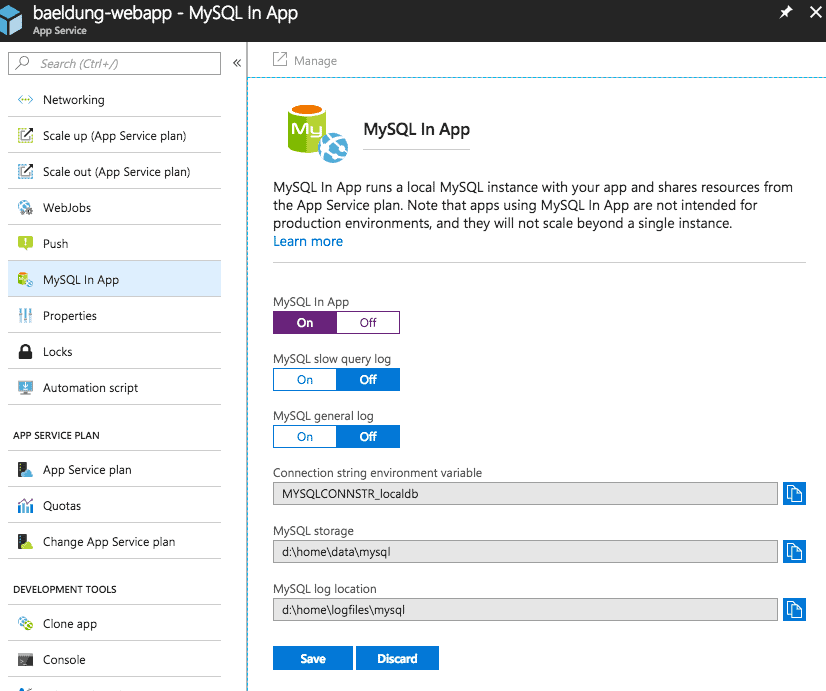
4.2. 使用 Azure In-App MySQL 的 Spring Boot 應用程序
@PostMapping("/user")
public String register(@RequestParam String name) {
    userRepository.save(userNamed(name));
    return "registered";
}

@GetMapping("/user")
public Iterable<User> userlist() {
    return userRepository.findAll();
}spring.datasource.url=jdbc:h2:file:~/test
spring.datasource.username=sa
spring.datasource.password=<configuration>
<authentication>
<serverId>azure-auth</serverId>
</authentication>
<javaVersion>1.8</javaVersion>
<resourceGroup>baeldung-group</resourceGroup>
<appName>baeldung-webapp</appName>
<appServicePlanName>bealdung-plan</appServicePlanName>
<appSettings>
<property>
<name>spring.datasource.url</name>
<value>jdbc:mysql://127.0.0.1:55738/localdb</value>
</property>
<property>
<name>spring.datasource.username</name>
<value>uuuuuu</value>
</property>
<property>
<name>spring.datasource.password</name>
<value>pppppp</value>
</property>
</appSettings>
</configuration>> mvn clean package azure-webapp:deploy
...
[INFO] Start deploying to Web App custom-webapp...
[INFO] Authenticate with ServerId: azure-auth
[INFO] [Correlation ID: cccccccc-cccc-cccc-cccc-cccccccccccc] \
Instance discovery was successful
[INFO] Updating target Web App...
[INFO] Successfully updated Web App.
[INFO] Starting to deploy the war file...
[INFO] Successfully deployed Web App at \
https://baeldung-webapp.azurewebsites.net> curl -d "" -X POST https://baeldung-webapp.azurewebsites.net/user\?name\=baeldung
registered
> curl https://baeldung-webapp.azurewebsites.net/user
[{"id":1,"name":"baeldung"}]5. 將容器化 Spring Boot 應用部署到 Azure
<plugin>
    <groupId>com.spotify</groupId>
    <artifactId>docker-maven-plugin</artifactId>
    <version>1.1.0</version>
    <configuration>
        <!-- ... -->
    </configuration>
</plugin>5.1. Azure 容器註冊表
az acr create --admin-enabled --resource-group baeldung-group \
--location japanwest --name baeldungadr --sku Basic> az acr credential show --name baeldungadr --query passwords[0]
{
"additionalProperties": {},
"name": "password",
"value": "xxxxxxxxxxxxxxxxxxxxxxxxxxxxxxxx"
}<server>
<id>baeldungadr</id>
<username>baeldungadr</username>
<password>xxxxxxxxxxxxxxxxxxxxxxxxxxxxxxxx</password>
</server>5.2. Maven 插件配置
<em pom.xml</em>> 中:<properties>
<!-- ... -->
<azure.containerRegistry>baeldungadr</azure.containerRegistry>
<docker.image.prefix>${azure.containerRegistry}.azurecr.io</docker.image.prefix>
</properties>
<build>
<plugins>
<plugin>
<groupId>com.spotify</groupId>
<artifactId>docker-maven-plugin</artifactId>
<version>1.0.0</version>
<configuration>
<imageName>${docker.image.prefix}/${project.artifactId}</imageName>
<registryUrl>https://${docker.image.prefix}</registryUrl>
<serverId>${azure.containerRegistry}</serverId>
<dockerDirectory>docker</dockerDirectory>
<resources>
<resource>
<targetPath>/</targetPath>
<directory>${project.build.directory}</directory>
<include>${project.build.finalName}.jar</include>
</resource>
</resources>
</configuration>
</plugin>
<!-- ... -->
</plugins>
</build><em>dockerDirectory></em> 中的值來定位 <em>Dockerfile</em>。 我們將 <em>Dockerfile</em> 放在 <em>docker</em> 目錄下,其內容如下:FROM frolvlad/alpine-oraclejdk8:slim
VOLUME /tmp
ADD azure-0.1.jar app.jar
RUN sh -c 'touch /app.jar'
EXPOSE 8080
ENTRYPOINT [ "sh", "-c", "java -Djava.security.egd=file:/dev/./urandom -jar /app.jar" ]5.3. 在 Docker 實例中運行 Spring Boot 應用
> mvn docker:build -DpushImage
...
[INFO] Building image baeldungadr.azurecr.io/azure-0.1
...
Successfully built aaaaaaaaaaaa
Successfully tagged baeldungadr.azurecr.io/azure-0.1:latest
[INFO] Built baeldungadr.azurecr.io/azure-0.1
[INFO] Pushing baeldungadr.azurecr.io/azure-0.1
The push refers to repository [baeldungadr.azurecr.io/azure-0.1]
...
latest: digest: sha256:0f0f... size: 1375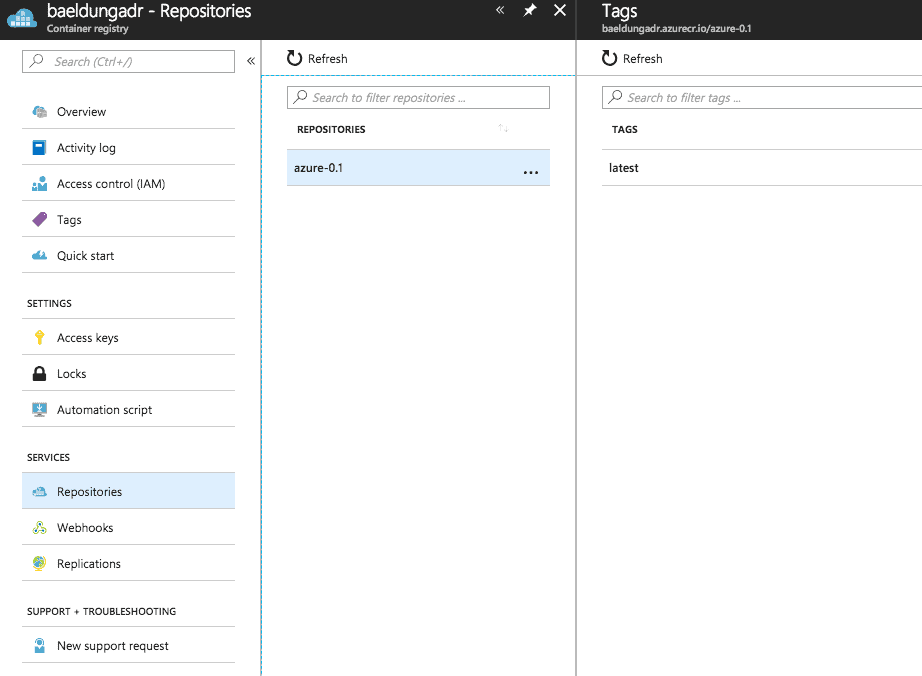
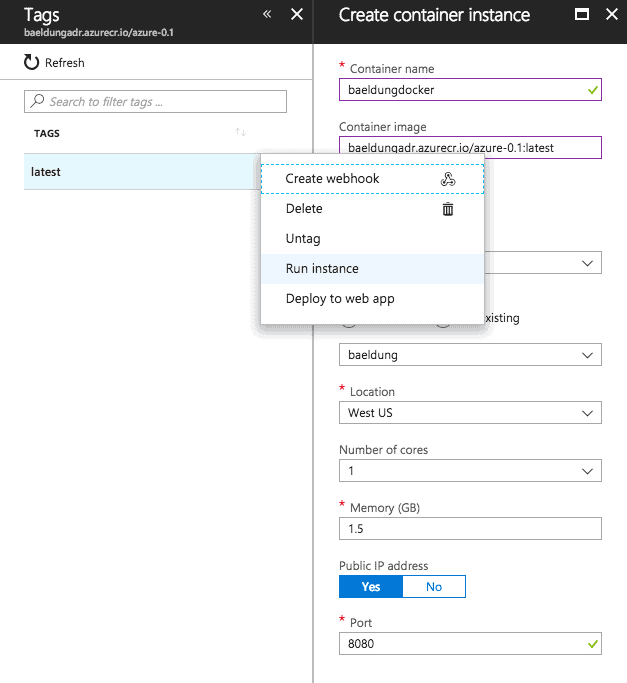
> curl http://a.x.y.z:8080/hello
hello azure!
5.4. Docker 容器部署
<configuration>
    <containerSettings>
        <imageName>${docker.image.prefix}/${project.artifactId}</imageName>
        <registryUrl>https://${docker.image.prefix}</registryUrl>
        <serverId>${azure.containerRegistry}</serverId>
    </containerSettings>
    <!-- ... -->
</configuration>6. 結論

